
n8n
Send n8n workflow traces and related telemetry to Parseable
n8n is often where a lot of small decisions in a system come together. A workflow might start from a webhook, call a few APIs, run an AI node, update a database, and then wait for another event before it continues.
To query or ingest Parseable data inside a workflow, use the Parseable community node for n8n.
When that workflow is simple, the execution page in n8n is usually enough. But once workflows become production paths, you need to see them beside the rest of your application telemetry. Parseable can receive n8n workflow traces through OpenTelemetry, so you can query and inspect workflow behavior from the same place where you already work with logs and traces.
What n8n exports
n8n now has native OpenTelemetry tracing for workflow and node executions. When tracing is enabled, n8n exports:
workflow.execute: one span for the workflow runnode.execute: one child span for each node execution
The workflow span carries details such as workflow ID, workflow name, execution ID, execution mode, status, node count, and error type when the run fails. Node spans carry node ID, node name, node type, node version, and item counts.
n8n also supports W3C trace context. If a webhook request includes a traceparent header, n8n can use that as the parent for the workflow span. For outbound HTTP requests, n8n can inject trace context so downstream services can continue the same trace.
Native OpenTelemetry support in n8n is currently focused on traces. n8n's documentation notes that OpenTelemetry-formatted metrics are still under development. For logs, collect the n8n process or container logs separately if you want them in Parseable.
Telemetry paths
Think of the integration as three paths, not one single stream where every signal behaves the same way.
Native n8n workflow traces go through OpenTelemetry:
n8n workflow and node executions
  -> OpenTelemetry Collector
  -> Parseable /v1/traces
  -> n8n-traces dataset
Logs are collected separately from the n8n process or container:
n8n process or container logs
  -> log shipper or Collector filelog receiver
  -> Parseable /v1/logs
  -> n8n-logs dataset
Metrics are separate for now:
runtime or infrastructure metrics
  -> metrics collector or Prometheus pipeline
  -> Parseable metrics dataset
The trace path is the main integration in this guide. Logs and metrics can still live in Parseable, but they should not be described as native n8n OpenTelemetry output today.
How the setup works
The clean path is to send n8n traces to an OpenTelemetry Collector and let the Collector export them to Parseable.
n8n
  -> OpenTelemetry Collector
  -> Parseable /v1/traces
  -> n8n-traces dataset
This keeps n8n configured with standard OpenTelemetry settings while Parseable-specific headers stay in the Collector. It also gives you one place to add batching, retries, filtering, or redaction later.
Prerequisites
You need a self-hosted n8n instance with OpenTelemetry tracing support, an OpenTelemetry Collector, and a Parseable instance that can receive OTLP traces.
If you run n8n in queue mode, set the OpenTelemetry configuration on every n8n process where tracing should be enabled, including main, worker, and webhook processors.
Enable tracing in n8n
Set these environment variables on your n8n instance:
export N8N_OTEL_ENABLED=true
export N8N_OTEL_EXPORTER_OTLP_ENDPOINT=http://otel-collector:4318
export N8N_OTEL_EXPORTER_SERVICE_NAME=n8n
Restart n8n after setting the variables.
The endpoint should point to the base OTLP HTTP endpoint of your Collector. n8n appends /v1/traces by default, so do not include /v1/traces in N8N_OTEL_EXPORTER_OTLP_ENDPOINT.
By default, n8n exports production executions. If you also want traces from manual or test executions while validating the setup, set:
export N8N_OTEL_TRACES_PRODUCTION_ONLY=falseFor high-volume instances, you can reduce trace volume with sampling:
export N8N_OTEL_TRACES_SAMPLE_RATE=0.1This exports roughly 10 percent of traces. n8n uses trace ID ratio sampling, so a trace is either kept with all its spans or dropped together.
Send traces to Parseable
Use the OpenTelemetry Collector to receive traces from n8n and export them to Parseable.
receivers:
  otlp:
    protocols:
      http:
        endpoint: 0.0.0.0:4318

processors:
  batch:

exporters:
  otlphttp/parseabletraces:
    endpoint: "https://<YOUR_PARSEABLE_URL>"
    headers:
      Authorization: "Bearer <YOUR_PARSEABLE_API_KEY>"
      X-P-Stream: "n8n-traces"
      Content-Type: "application/x-protobuf"
    encoding: proto

service:
  pipelines:
    traces:
      receivers: [otlp]
      processors: [batch]
      exporters: [otlphttp/parseabletraces]
Replace <YOUR_PARSEABLE_URL> with your Parseable base URL, for example http://parseable:8000 or your Parseable Cloud endpoint.
If your Parseable deployment still uses basic authentication, replace the Bearer token with a Basic Auth value.
headers:
  Authorization: "Basic <base64 encoded username:password>"
  X-P-Stream: "n8n-traces"
  Content-Type: "application/x-protobuf"
Docker Compose example
Here is a small example showing n8n and the Collector together. Keep the Parseable endpoint and API key in environment variables in your real deployment.
services:
  n8n:
    image: n8nio/n8n:latest
    ports:
      - "5678:5678"
    environment:
      N8N_OTEL_ENABLED: "true"
      N8N_OTEL_EXPORTER_OTLP_ENDPOINT: "http://otel-collector:4318"
      N8N_OTEL_EXPORTER_SERVICE_NAME: "n8n"
      N8N_OTEL_TRACES_PRODUCTION_ONLY: "false"
    depends_on:
      - otel-collector

  otel-collector:
    image: otel/opentelemetry-collector-contrib:latest
    command: ["--config=/etc/otelcol/config.yaml"]
    volumes:
      - ./otel-collector.yaml:/etc/otelcol/config.yaml
    ports:
      - "4318:4318"
Run a workflow after the stack starts. You should then see a dataset such as n8n-traces in Parseable.
What to look for in Parseable
Once traces arrive, start with the n8n-traces dataset. The useful fields are usually the ones that describe the workflow run and the node that ran inside it.
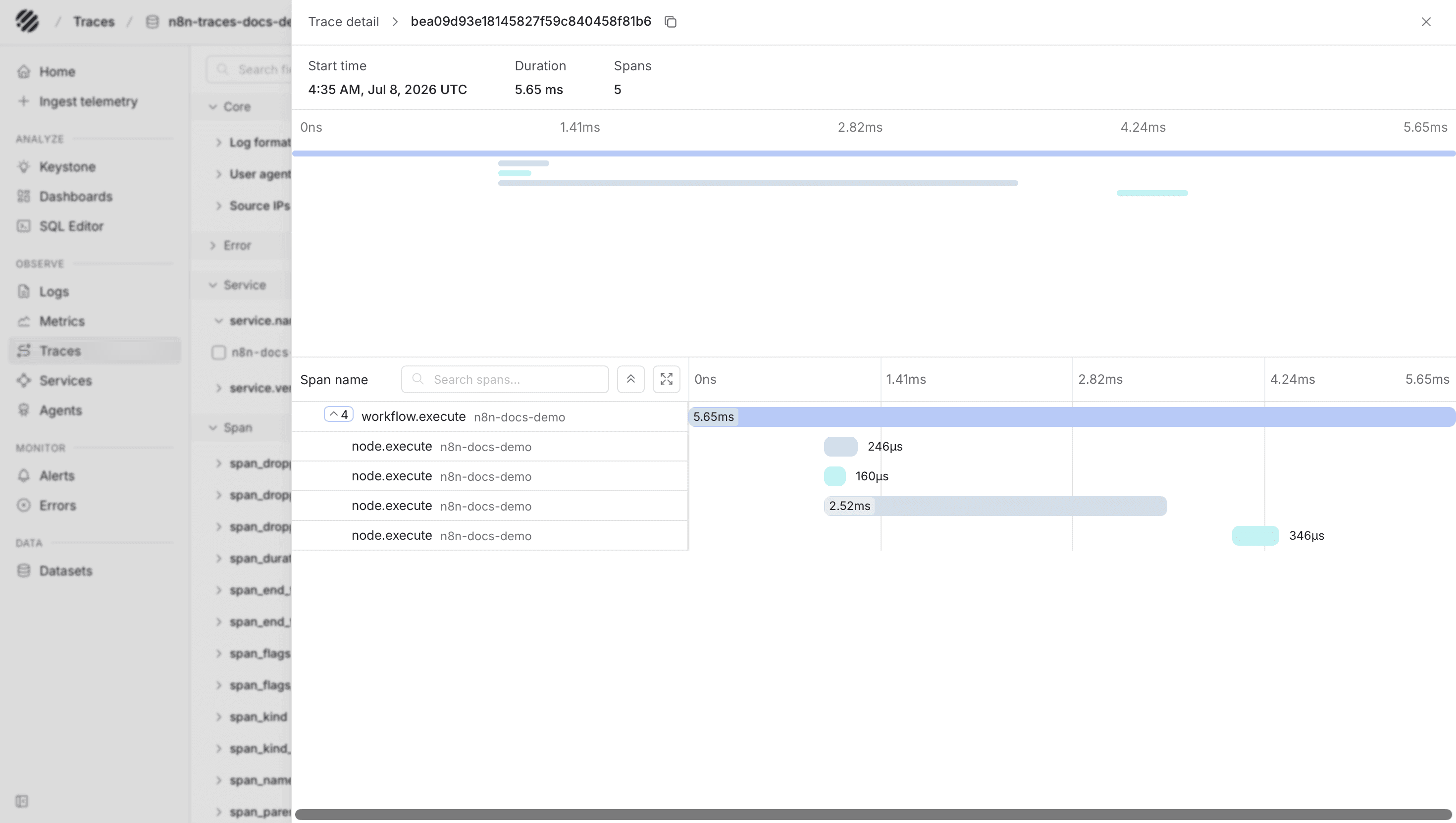
For recent failed executions:
SELECT
  p_timestamp,
  span_name,
  "n8n.workflow.name",
  "n8n.execution.id",
  "n8n.execution.status",
  "n8n.execution.error_type"
FROM "n8n-traces"
WHERE "n8n.execution.status" = 'error'
ORDER BY p_timestamp DESC
LIMIT 50;
For slow workflow spans:
SELECT
  p_timestamp,
  span_name,
  "n8n.workflow.name",
  "n8n.execution.id",
  ROUND(("span_end_time_unix_nano" - "span_start_time_unix_nano") / 1000000.0, 2) AS duration_ms
FROM "n8n-traces"
WHERE span_name = 'workflow.execute'
ORDER BY duration_ms DESC
LIMIT 20;
For slow node spans:
SELECT
  p_timestamp,
  "n8n.workflow.name",
  "n8n.node.name",
  "n8n.node.type",
  ROUND(("span_end_time_unix_nano" - "span_start_time_unix_nano") / 1000000.0, 2) AS duration_ms
FROM "n8n-traces"
WHERE span_name = 'node.execute'
ORDER BY duration_ms DESC
LIMIT 20;
These queries are meant as starting points. Field names can vary slightly depending on the n8n version and how the spans are flattened after ingestion, so check a few recent records in Parseable first and adjust the column names if required.
Dashboards
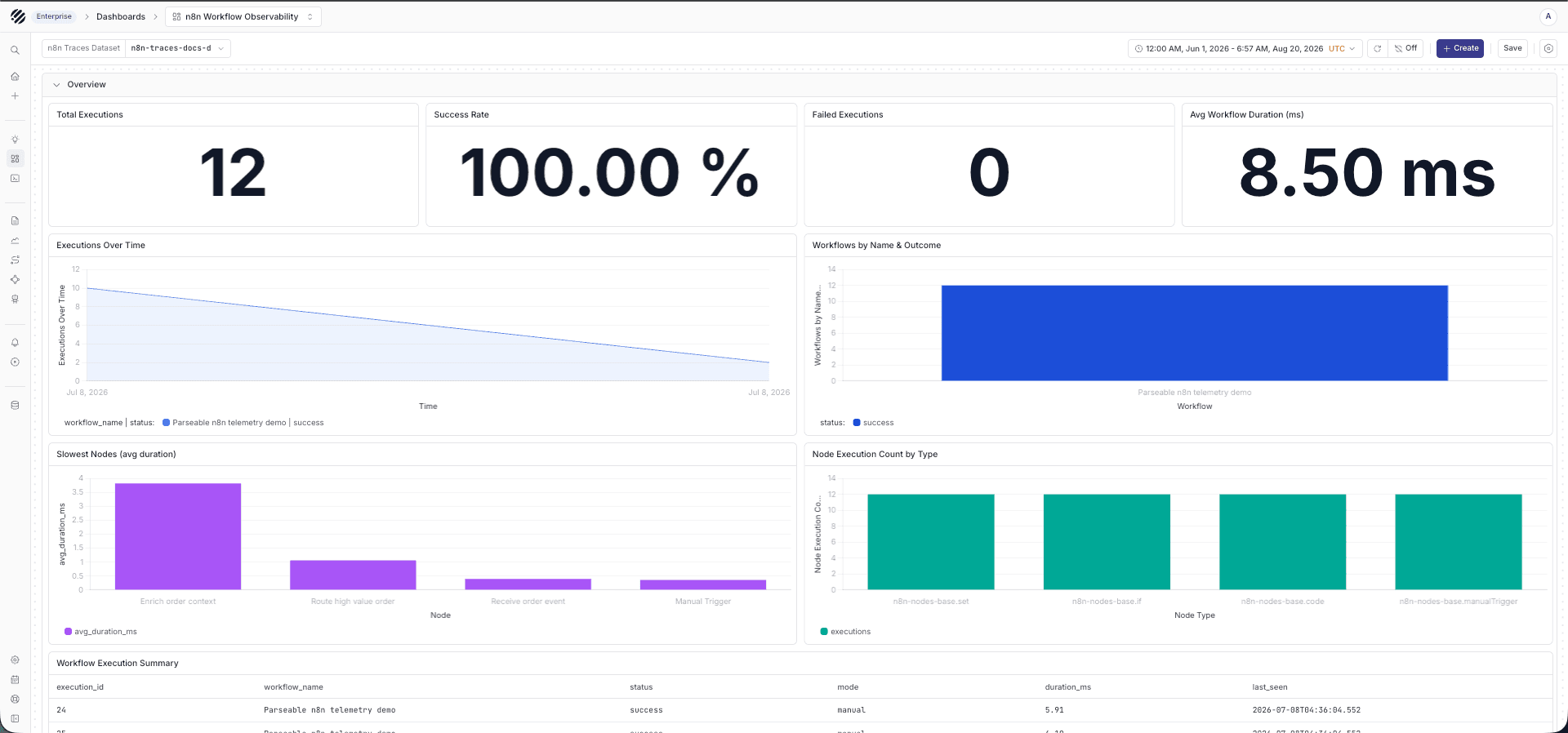
After traces are flowing, you can use a dashboard to keep the main workflow signals in one place instead of writing ad hoc queries each time. Parseable provides an n8n workflow observability dashboard in parseablehq/dashboards. Use it as a starting point, then map the dataset variable to your n8n-traces dataset.
The dashboard covers execution volume, success rate, average duration, the slowest nodes, node execution counts by type, a per-execution summary table and a recent errors table - all from the workflow.execute and node.execute spans described above.
Logs and metrics
n8n's native OpenTelemetry path currently sends workflow traces. If you also want logs in Parseable, collect n8n process or container logs with your existing log shipper or with the OpenTelemetry Collector filelog receiver, then export them to Parseable's /v1/logs endpoint.
The log path usually looks like this:
n8n logs
  -> filelog receiver or log shipper
  -> Parseable /v1/logs
  -> n8n-logs
Metrics should be treated separately for now. n8n's own OpenTelemetry documentation says OpenTelemetry-formatted metrics are still coming, so avoid documenting them as native n8n OpenTelemetry output until that support is available.
For metrics, use the metric source you already trust for your deployment, such as container, host, or Kubernetes metrics. Those can be sent to Parseable through your metrics pipeline, but they are not the same thing as n8n native OpenTelemetry metrics.
Troubleshooting
If traces do not appear in Parseable, first check that n8n can reach the Collector:
docker compose logs n8n | grep -i otel
docker compose logs otel-collector
Then verify the endpoint shape. n8n should point to the Collector base URL, such as http://otel-collector:4318. The Collector should point to the Parseable base URL, such as https://<YOUR_PARSEABLE_URL>, and the exporter should send trace data through the OTLP HTTP exporter.
Also check sampling and execution type. If N8N_OTEL_TRACES_PRODUCTION_ONLY=true, manual executions may not show up. During setup, temporarily set it to false, run a workflow, and then switch it back if production-only traces are what you want.
References
Was this page helpful?