
RAG, or Retrieval-Augmented Generation, became the default way to connect large language models to external data. It works well when the model needs more context from documents, runbooks, knowledge bases, or previously indexed content. That is why many early AI workflows in observability also leaned on RAG. Teams wanted the model to answer questions using internal logs, docs, and operational knowledge instead of relying only on pretraining.
But observability is not only a retrieval problem. It is also a live systems problem. Engineers do not just want an LLM to quote documentation about an incident. They want it to inspect a stream schema, understand current telemetry, generate a valid query, and sometimes take a structured action such as creating a dashboard or preparing an alert. That is where MCP starts to look more useful than a retrieval-only pattern. MCP is an open standard for connecting AI applications to external systems, tools, and workflows, which makes it a better fit for real-time, tool-driven observability tasks.
In this post, we use Parseable as a practical example. The goal is simple: use Claude Desktop with a Parseable MCP server to generate a dashboard from a prompt. That makes this article less about theory and more about what actually changes when you move from RAG-style retrieval to MCP-style system interaction.
But before that, let’s understand MCP in a bit detail.
What is MCP?
MCP i.e. Model Context Protocol is a framework by Anthropic which allows developers to build agentic workflows requiring real-time or private data in an LLM-agnostic manner (MCP Blog). This allows developers to augment their users’ experience by enabling LLMs to fetch data from anywhere like a PostgreSQL database or a FTP server or even an API.
MCP consists of two components - MCP server and MCP client.
MCP Server
The MCP server acts as the interface between the MCP client, data source system and LLMs. It holds all the business logic required to fetch information from the specific data source. It also holds predefined prompts to perform certain operations. This is essentially an HTTP server that exposes the business logic via REST API.
Specifically, MCP server exposes Tools and Prompts as primitives. These primitives enable clients leverage specific functionalities of the backing data store and LLM in a structured way.
An MCP server is an HTTP server which exposes multiple resources to the client. A resource could be anything ranging from a set of APIs fetching real-time data from a remote server to a private PostgreSQL database server serving records.
MCP Client
MCP client is the interface between a user and an LLM. Clients have to be written specifically for a given server, i.e.
An MCP Client is an interface between a user and an LLM. It also maintains a 1:1 connection to an MCP Server and exposes the server’s capabilities to the LLM.
The best way to understand it is by taking an example of the Claude Desktop app. The app in this case is a client and in the beginning, it is not exposed to any MCP Servers so it can only answer based on the current knowledge that the LLM has.
Lets assume that the user writes a server which connects to and runs queries against a PostgreSQL database and makes the client aware of that server. Now the LLM (through the client) can access the PostgreSQL server and fetch data from it to answer the user’s questions about their private data.
Why teams compare MCP and RAG for observability
Teams compare MCP vs RAG for observability because observability workflows have different needs from typical AI knowledge workflows. RAG is designed to improve answers by retrieving and injecting relevant context. That is useful when the source of truth already exists in text form. But many observability tasks depend on live state, current schemas, structured APIs, and tool calls that have to return fresh results in the right format. In those cases, the model needs more than retrieved context. It needs controlled access to a system.
Why observability is different from general knowledge retrieval
Observability data changes constantly. Streams evolve, fields vary by source, and useful answers often depend on the latest logs, metrics, or traces rather than archived content. If an engineer asks, “Show me failed requests grouped by service in the last 30 minutes,” that is not a document search task. It is a live data task. The model needs the current schema, a valid query path, and a safe way to execute the request against the observability backend.
Where RAG still works well
RAG still has a place in observability. It is useful for retrieving postmortems, runbooks, internal documentation, onboarding notes, and previous incident records. If the goal is to ground an answer in written operational knowledge, RAG is still a strong fit. It helps the model explain systems, summarize best practices, and answer questions that depend on existing text rather than current system state.
Where MCP fits better
MCP fits better when the model must do more than read. The protocol allows servers to expose tools, prompts, and resources to a client, which means the model can discover capabilities, call functions, and work with structured context from external systems. In observability, that could mean fetching a stream schema, preparing a dashboard object, or posting that object back to the backend. That is the difference that matters most: RAG helps the model retrieve context, while MCP helps the model interact with live systems in a structured way.
Why MCP is better suited to live observability workflows
Observability work is often procedural. The model may need to inspect a schema, write a query, transform output into a dashboard definition, and then submit that definition to the backend. MCP is a better fit for this kind of flow because it gives the model bounded access to explicit system capabilities. It is not just about adding more context. It is about giving the model a structured path to interact with a live backend.
Why Parseable is a strong MCP use case
Parseable makes this MCP workflow especially compelling because the product already supports the kind of structured observability experience that works well with prompt-driven actions. Parseable brings logs, metrics, and traces into one platform, supports PostgreSQL-compatible SQL queries, includes dashboards and alerts, and runs as a single unified binary or container image with no extra dependency required to get started.
It also supports OpenTelemetry pipelines, including OTLP over HTTP, OTLP over gRPC, and OTel Collector integrations. That matters because the value of MCP increases when the backend already has a clean, modern way to ingest and query telemetry. Parseable provides that foundation, so the MCP layer can focus on exposing the right tools and prompts instead of compensating for a fragmented backend.
In short, Parseable is not just a convenient demo target. It is a good example of how MCP can sit on top of a cloud-native observability backend and turn prompt-driven actions into something actually useful. In this case, that useful action is generating a dashboard from a prompt using a live stream schema.
Building prompt-driven observability workflows with Parseable
The workflow in this article focuses on a simple but practical use case: creating a dashboard in Parseable with the help of Claude Desktop and a custom MCP server. Parseable dashboards are driven by structured queries, so the model needs enough context to understand the stream schema and enough structure to produce a valid dashboard object. That makes it a natural MCP problem.
What this setup does
The Parseable MCP server in this workflow exposes two tools and one prompt:
get-schema, which fetches the schema for a streampost-dashboard, which sends a request to create a dashboardgenerate-dashboard-object, which describes the dashboard format and API requirements
This gives Claude everything it needs to turn a natural-language request into a dashboard that Parseable can actually render.
High-level architecture
At a high level, the setup has three parts:
- A running Parseable instance with observability data already ingested
- A custom Parseable MCP server that knows how to talk to Parseable
- Claude Desktop, acting as the MCP client
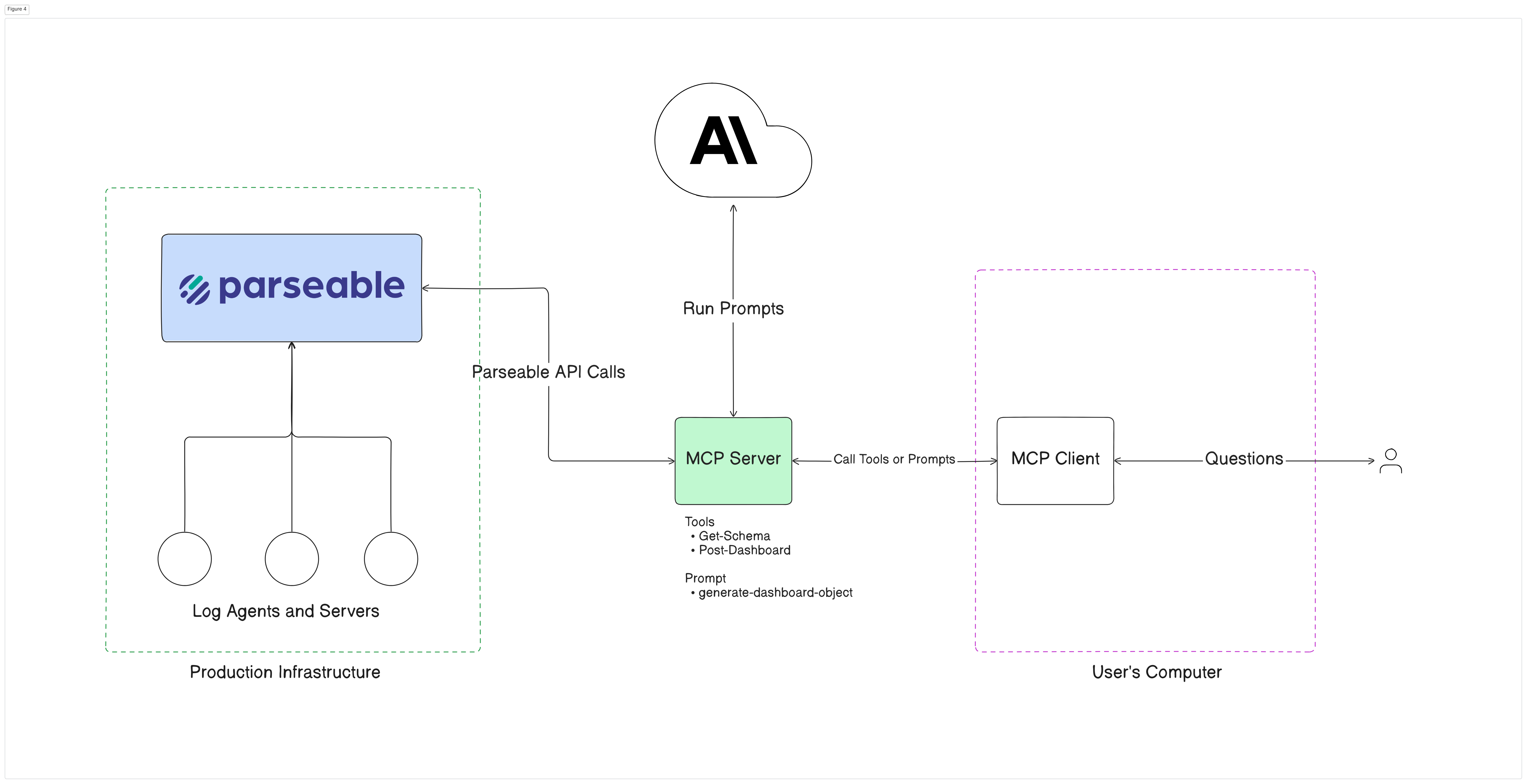
The client uses the server’s exposed tools and prompt to fetch the schema, generate the dashboard object, and submit it to Parseable. This is exactly the kind of bounded, tool-driven workflow that MCP handles better than retrieval alone.
Below diagram shows the high level architecture that we’re going to set up in this blog. On one side you have a Parseable cluster running with observability data coming in. On the other side you have a MCP Server-Client pair.
How to set up MCP with Parseable
Background
Dashboards in Parseable require the user to write a SQL query which is then executed by the Parseable server and the resulting data is used to generate the required plot.
This is where MCP comes in. Using Parseable MCP server, a user can spin up elaborate dashboards within minutes! Let’s see how.
Prerequisites
Before starting, make sure you have Claude Desktop installed and a Parseable server running with observability data ingested. The Parseable quickstart also notes that you can run Parseable locally with Docker and log in using the default admin/admin credentials for local testing.
Step 1: Set up the Parseable MCP server
Download the Parseable MCP server code
git clone git@github.com:parseablehq/blog-samples.git
cd blog-samples/mcp-parseable
Create a virtual environment and install the requirements
python -m venv venv
pip install -r requirements.txt
Navigate to the .env inside src directory. Set the correct Parseable server credentials in the .env file
vi src/.env
PARSEABLE_API_BASE=http://localhost:8000
P_USERNAME=admin
P_PASSWORD=admin
Finally start the the MCP server
python3 src/server.py
Setup the MCP Client
Step 2: Configure Claude Desktop as the MCP client
Open the Claude Desktop configuration file from File -> Settings -> Developer -> Edit Config, then add the Parseable MCP server entry. The command should point to the Python executable inside your virtual environment and the path to server.py:
{
    "mcpServers": {
        "mcp_parseable": {
            "command": "YOUR:\\VENV\\Scripts\\python.exe",
            "args": [
                "YOUR:\\PATH\\mcp-parseable\\src\\server.py"
            ]
        }
    }
}
Once Claude Desktop is configured correctly and the Parseable MCP server is running, the client will expose the server’s available tools and prompts to the model.
Step 3: Generate a dashboard from a prompt
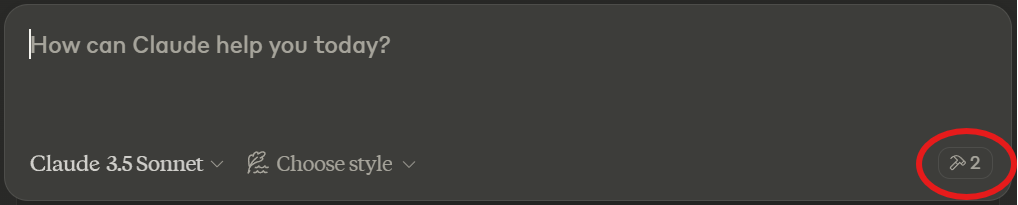
Once the MCP Client is configured successfully, let’s attempt at using the workflow generate a dashboard. Ensure that the Desktop app shows two small hammers as available tools and the Parseable Server is running.
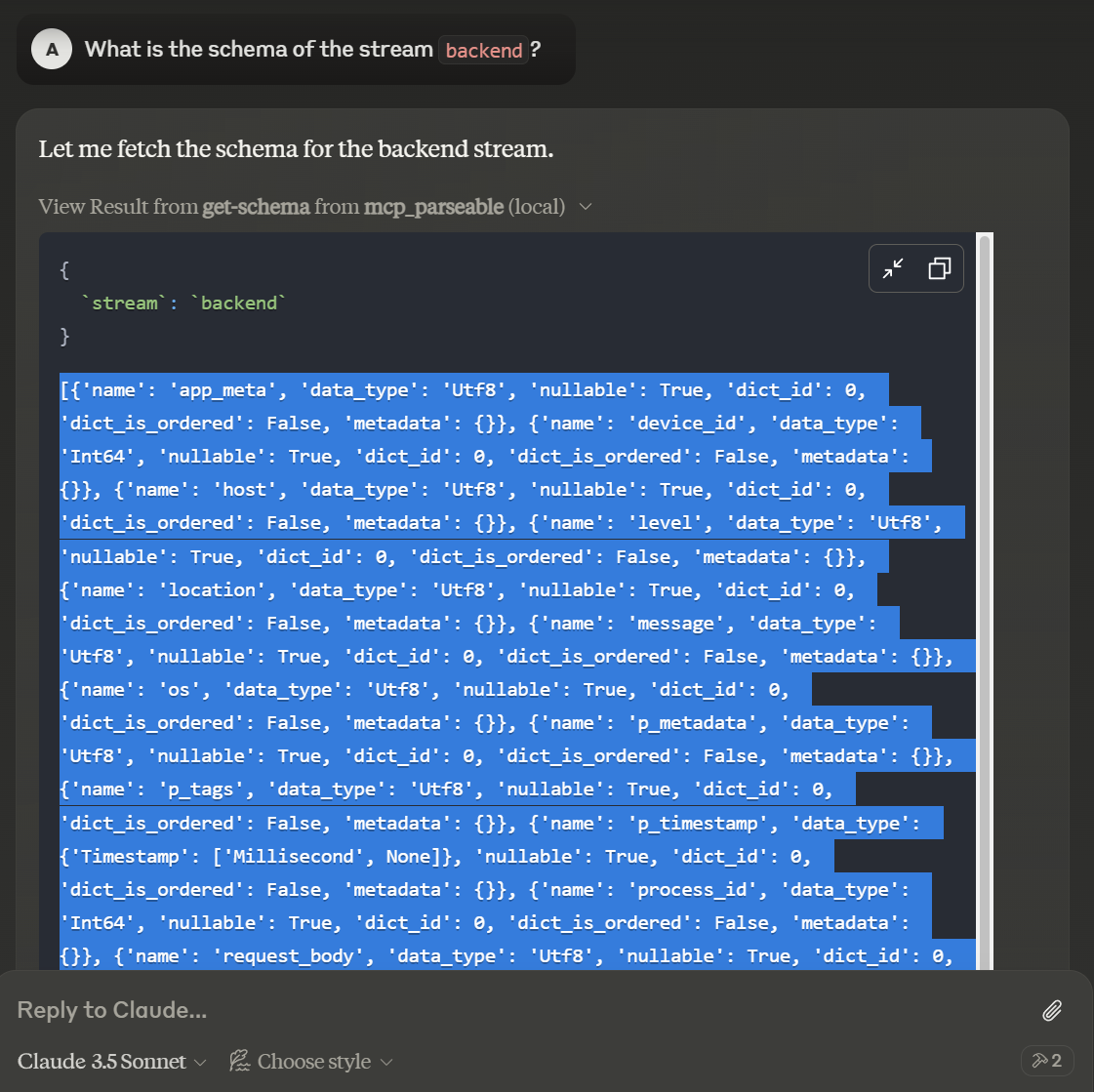
Prompt Claude to tell you the schema for the stream you want to create a dashboard for. View the result of the get-schema tool and copy the returned schema.
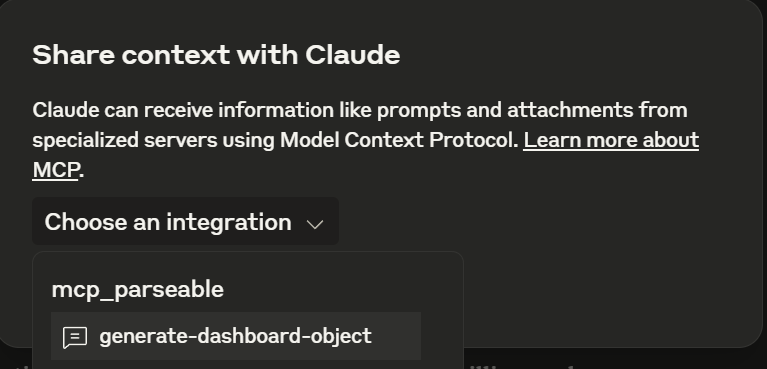
Now hover over the “attach pin” and select the Attach from MCP option

Select the mcp_parseable server and choose generate-dashboard-object prompt
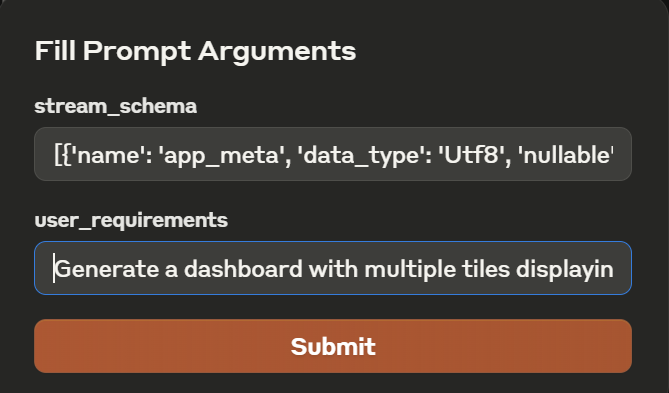
You’ll be given a pop-up demanding two arguments. The first one is the schema of the stream for which we want to create a dashboard and the second one is the description of tiles to show in the dashboard. Paste the copied schema in the first one. (Both arguments are required)
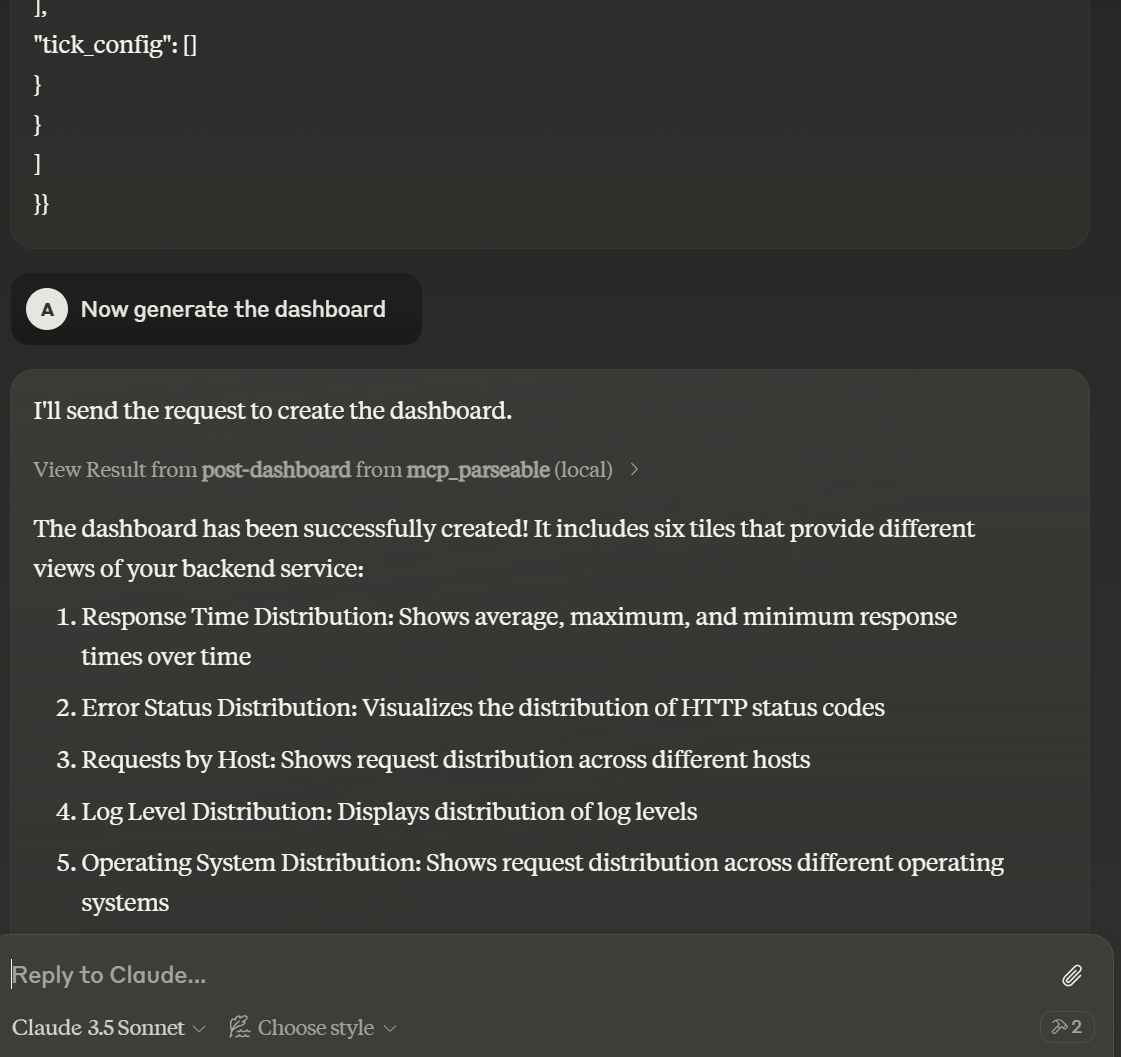
Claude will generate an object which it can directly use to create a dashboard. Prompt it to do so
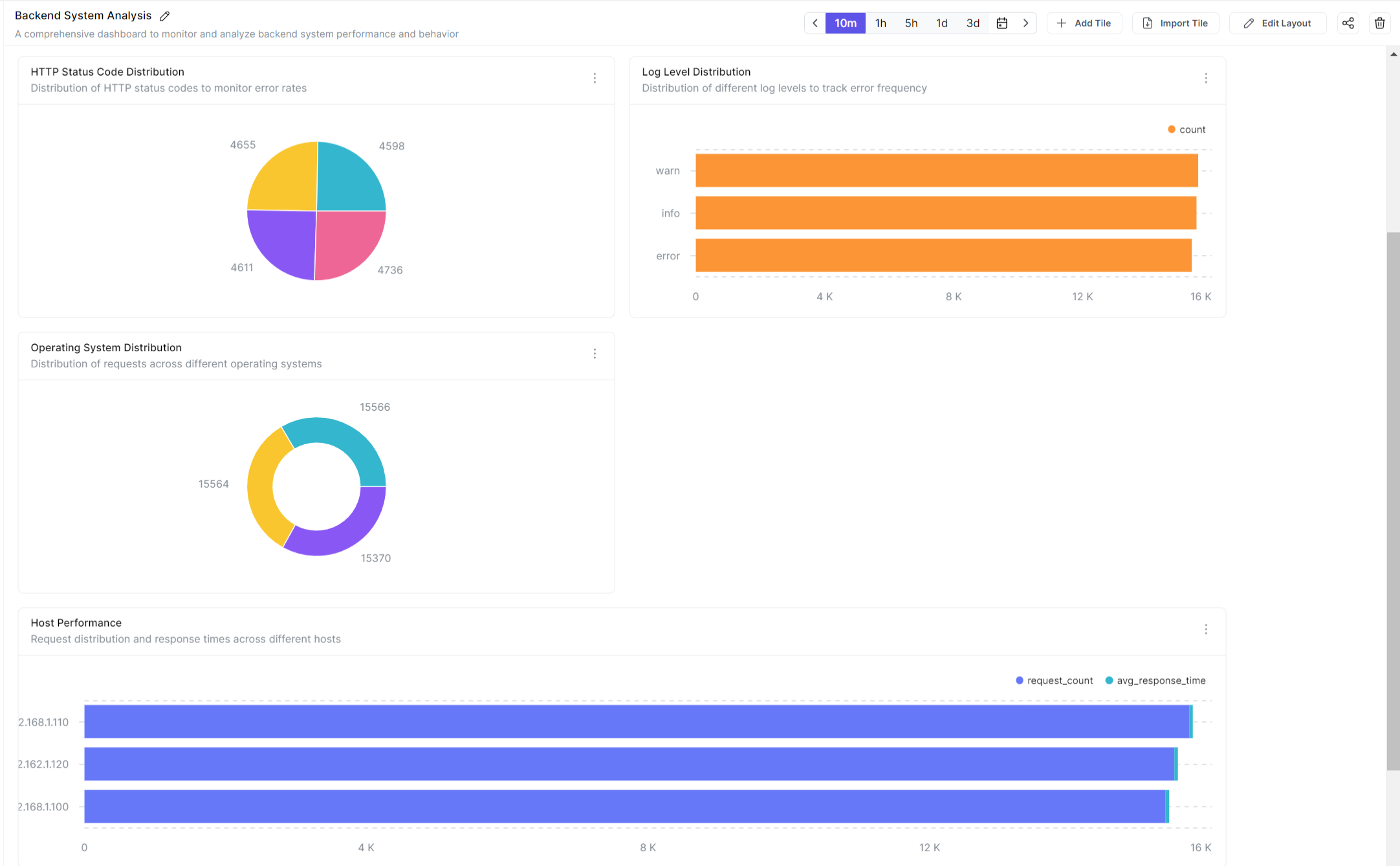
You can now head over to the Parseable Server to see the dashboard generated by Claude.
MCP vs RAG for observability: when should you use each?
Use MCP when the model needs live system access. That includes cases where it must inspect schemas, work with current telemetry, invoke bounded tools, or produce structured outputs such as dashboard objects, alert configurations, or system-ready queries. MCP is the better fit for agentic observability workflows because it treats system interaction as a first-class capability.
Use RAG when the main problem is knowledge retrieval. If the model needs to search documentation, postmortems, runbooks, onboarding content, or historical incident notes, RAG is still a useful pattern. It helps ground responses in the right operational context, especially when the task is explanatory rather than action-oriented.
In practice, many teams will end up using both. RAG is good for pulling the right knowledge into the conversation. MCP is better for interacting with live systems. The mistake is treating them as interchangeable. For observability, they solve different parts of the workflow.
Final verdict
So, is MCP a better alternative to RAG for observability? For live, structured, tool-driven observability workflows, yes. RAG still makes sense when the task is retrieving operational knowledge, but it is not the best default when the model needs fresh telemetry, system-aware context, and a safe way to take action. MCP gives the model a more direct and more structured path into the observability backend.
The Parseable dashboard example makes that difference concrete. Claude is not simply reading indexed content and paraphrasing it. It is discovering a schema, using a prompt to generate a valid dashboard object, and then creating that dashboard in a running observability system. That is the kind of workflow where MCP is not just different from RAG. It is better suited to the job.
All the code used in this blog is available here: https://github.com/parseablehq/blog-samples/tree/main/mcp-parseable