
Traditionally, it has been quite straightforward - if you want a fast system, ensure your software is designed to keep the primary data in memory or on a local disk. Users would just need to run the software on machines sized to hold everything in memory / disk.
There are headwinds that are challenging this basic assumption. First of all the data volumes are growing across the board. At the same time, the compute and memory prices have grown several times in the last year.
The traditional in-memory / on-disk doesn’t work anymore. So, we started building Parseable, ~4 years ago with object store as the primary storage target. This means Parseable is a stateless layer on top of an object store and offers a complete set of observability featureset.
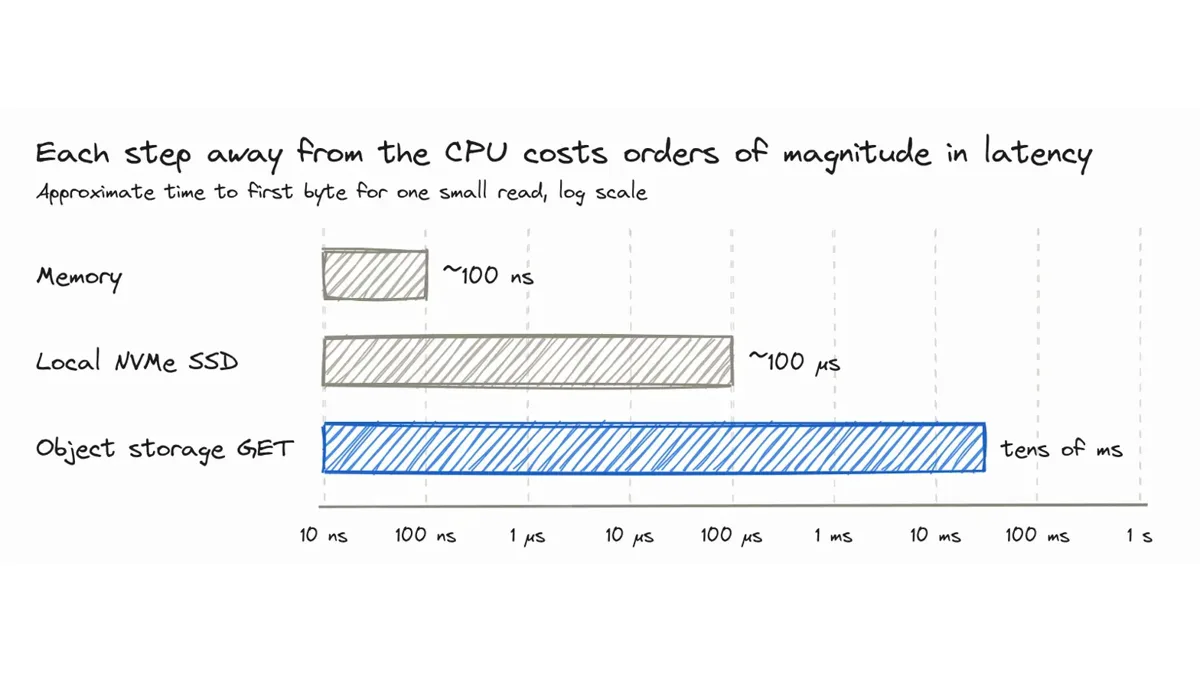
We come across the question frequently - “Isn’t Parseable slow because of object store?”. Physically, object stores are one of the slowest systems, especially when reading small files.
Memory for example takes ~100 nanoseconds. A locally attached NVMe drive takes ~100 microseconds. But if you ask S3 for a small object, you're looking at tens of milliseconds to get the first byte, and you always pay for each request.
In this post we analyse - how slow really is object store? What is the latency? How does it vary based on query patterns? And finally, can we intelligently manage cache to ensure a reliable, scalable and fast observability platform?
We start with a production grade Parseable cluster, run the same three queries against it with the data coming first from the bucket and then from local SSD, and measure where the time goes.
The setup
We set up a Parseable cluster on Google Cloud Storage, querying logs-dataset. We have timed the same queries with the data being read from the bucket and from the local SSD.
Everything in this post is from this cluster. It is a distributed Parseable cluster, comprised of 3 nodes, one of each type:
- An ingestor, which receives the logs, stages them locally and commits Parquet files and manifests to the bucket.
- A querier, which runs every query in this experiment. It is the node whose memory and SSD store the caches.
- A Prism node, which handles role, user and dataset management APIs.
| Component | Details |
|---|---|
| Parseable version | v3.2.5 |
| Object storage | Google Cloud Storage (GCS) |
| Querier | n2-standard-48, 16 vCPU, 64 GiB memory, 2 TiB persistent volume for the hot tier |
| Dataset | logs-dataset |
| Events | 17.3 billion in the last 24 hours (17,268,006,000), about 12 million per minute |
| Size in Parquet | 1.67 TB for the whole dataset in the bucket; about 900 GB for the last 24 hours |
| Time span | Every query covers the last 24 hours |
| Metadata cache | 750 MB |
| Hot tier | The last 24 hours of logs-dataset, about 900 GB, synced before the hot runs |
How does querying work in Parseable
Let’s take a common query. It groups errors by the message in logs-dataset. We’ll use this same query later in the post as well:
SELECT "body_message", count(*) AS errors
FROM "logs-dataset"
WHERE severity_text = 'ERROR'
GROUP BY "body_message"
ORDER BY errors DESC
When you run this on Parseable, on a cold query node (with nothing cached locally), this query would issue three classes of requests to object storage, in this order:
- Manifests. Before it can open a parquet file, the query node needs to read the manifests for each day in the query’s time window. Every ingestor writes one manifest a day: a list of the parquet files it wrote that day, plus their column metadata. So with one ingestor, a one-hour query reads a single manifest, and a seven-day query reads seven or eight. With multiple ingestors, the count of manifests also increases. Manifests are always fetched from object storage, whatever the cache state.
- Parquet footers. For each parquet file that the manifest did not rule out, the query node reads the footer of the file. This footer acts as an index that contains the location of every column chunk in the file, along with statistics about their contents. This is a ranged read from the end of the file. If the metadata cache is enabled, the footer may be served from process memory.
- Column chunks. For the row groups that the footer cannot rule out, the query node issues ranged GETs for the column chunks that it needs: in this case,
body_messageandseverity_text, two out of over a hundred columns. DataFusion merges nearby ranges into a single read where it can, but a large file with many row groups still needs several.
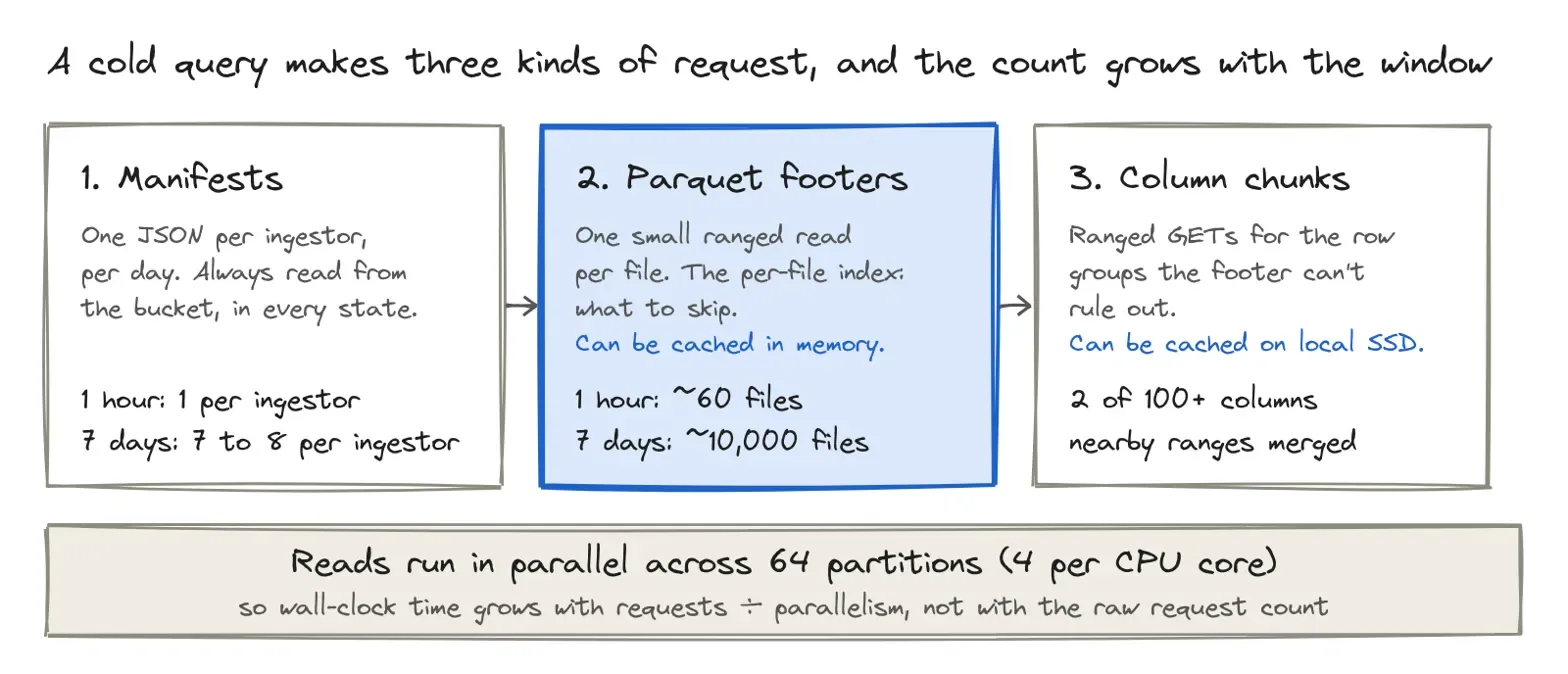
Parquet footer acts as a miniature index for the file it belongs to, since each column chunk's min and max can be used to eliminate an entire file or row group before reading any of its data. All those files not inspected are a set of requests that will never be made.
How many S3 API requests is that?
Each ingestor writes roughly one parquet file per minute of data, so the number of files a cold query has to consider grows with the length of its window:
| Window | Files (approx.) | Manifests (per ingestor) | GET calls | GET range calls |
|---|---|---|---|---|
| Last 1 hour | ~60 | 1 | ~1+ | ~47,000 |
| Last 24 hours | ~1,440 | 1-2 | 25+ | ~1.12 million |
| Last 7 days | ~10,000 | 7-8 | ~175+ | ~7.87 million |
The values are calculated at 24-hr intervals since the test. 1hr and 7-day figures are based on estimates. GET Range requests dominate due to the large number of row groups per Parquet file and the fact that the query is reading byte ranges of the relevant column chunks. The low number of GET requests is because some objects are read in their entirety (such as manifests). Both GET and GET Range requests are priced identically by S3.
There are three figures of interest in these numbers: requests × latency, divided by concurrent requests, is wall-clock time; requests × price is the bill; bytes fetched is the bandwidth. The bill is the least of our worries: at $0.0004 per 1,000 GET requests to S3 Standard in us-east-1, the roughly 1.125 million GET and ranged GET requests in the 24-hour test would cost about 45 cents. The latency is the challenge.
This is where parallelism comes in. The query plan splits the scan into partitions, four per CPU core, so 64 on our 16-vCPU querier, and makes requests 64 at a time instead of one after another. The 24-hour cold query made about 1.12 million ranged GETs and 25 whole-object GETs. At ten milliseconds per request, issuing them one by one would take about 3.1 hours. Across 64 parallel streams, that becomes roughly 17,577 rounds, or 176 seconds. This is a back-of-the-envelope upper bound: range merging and overlapping network reads with query execution reduce the observed wall-clock time. Even so, object-store latency remains part of the cold-query path, which is exactly what the Smart Cache removes from most queries.
Parallelism has a ceiling. S3 allows at least 5,500 GET requests per second per prefix, and a GCS bucket starts at about 5,000 reads per second. Past that, requests get rejected and retried.
A thin caching layer to speed it up
A query node can contain two different kinds of local copies: in-memory (Parquet metadata cache) and on-disk (Smart Cache).
- On the local disk: the Smart Cache. This tier keeps the most recent Parquet files on the local SSD of the query node, in the volume dedicated to each dataset. This is what's relevant for this post: if a file is on the SSD, the query will read its data from there, and never issue a GET for it.
- In memory: the Parquet metadata cache. Parseable runs its queries on DataFusion, which has a runtime parameter,
P_PARQUET_METADATA_CACHE_SIZE, that caches Parquet footers in memory, up to the size you give it. The footer contains the row-group metadata, the min/max values that the engine uses to decide which row groups to skip. The cache has a size limit, nothing more: whenever it reaches it, entries are evicted to stay under that limit, no matter how often they are used.
Manifests are an exception in that they are read from the object storage for each query, independent of the cache. They are also small, and there is one per ingestor (per day in the query window), so the count is the number of ingestors times the number of days (as opposed to files).
The Smart Cache works as follows:
- We can turn it on by setting
P_HOT_TIER_DIRto a local directory on the query node, and size each dataset. - It fills in reverse chronological order. A scheduler watches the bucket for new files every minute and downloads them into the hot-tier directory, keeping track of them in hottier.manifest.json.
- When the budget for the dataset is exhausted, or the disk's usage threshold is crossed, the oldest files are evicted.
- At query time, we read those files which are found locally directly from the SSD (without an S3 GET), and read the rest from the bucket.
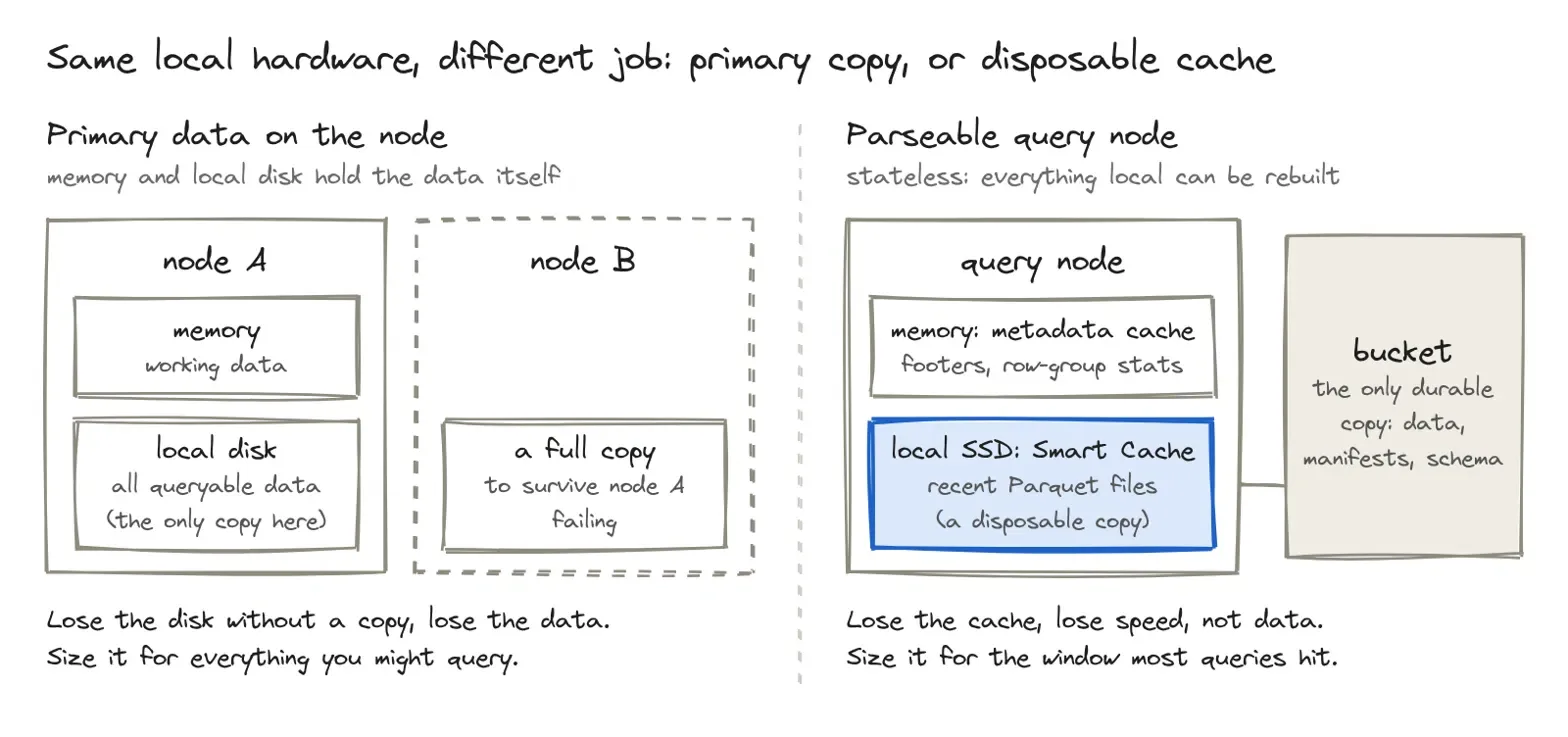
This represents a difference from other systems that keep the primary data of the system in memory or local disk. Local storage is a copy (and must keep everything that may be queried) and also has to be copied elsewhere (because losing the disk would mean losing the data). To Parseable, local storage is a cache, which you can size for speed, not safety, and which you can throw away at any time.
Common observability queries
Even if cache has recent data, it is only useful if most of the queries are in the recent time range - essentially how do we optimize for cache hits. Let's look common queries:
- Alerts that run every minute or so, and evaluate the last few minutes.
- Dashboards that update themselves and typically show the last hour's data, or the last 24 hours.
- On-call investigations initiated by an on-call person looking into an incident, a spike, or a deployment that happened that morning.
They all look at the last few hours. The old data is typically queried for a postmortem or a report that happens once a month, but not as often.
We are not the first to notice this. When Facebook was building Gorilla, the in-memory time series database that powered its monitoring, they discovered that at least 85% of all their monitoring queries were for data gathered in the previous 26 hours. So they kept the last 26 hours in-memory in Gorilla, and it's the same reason a cache that spans the last day is useful to answer most queries.
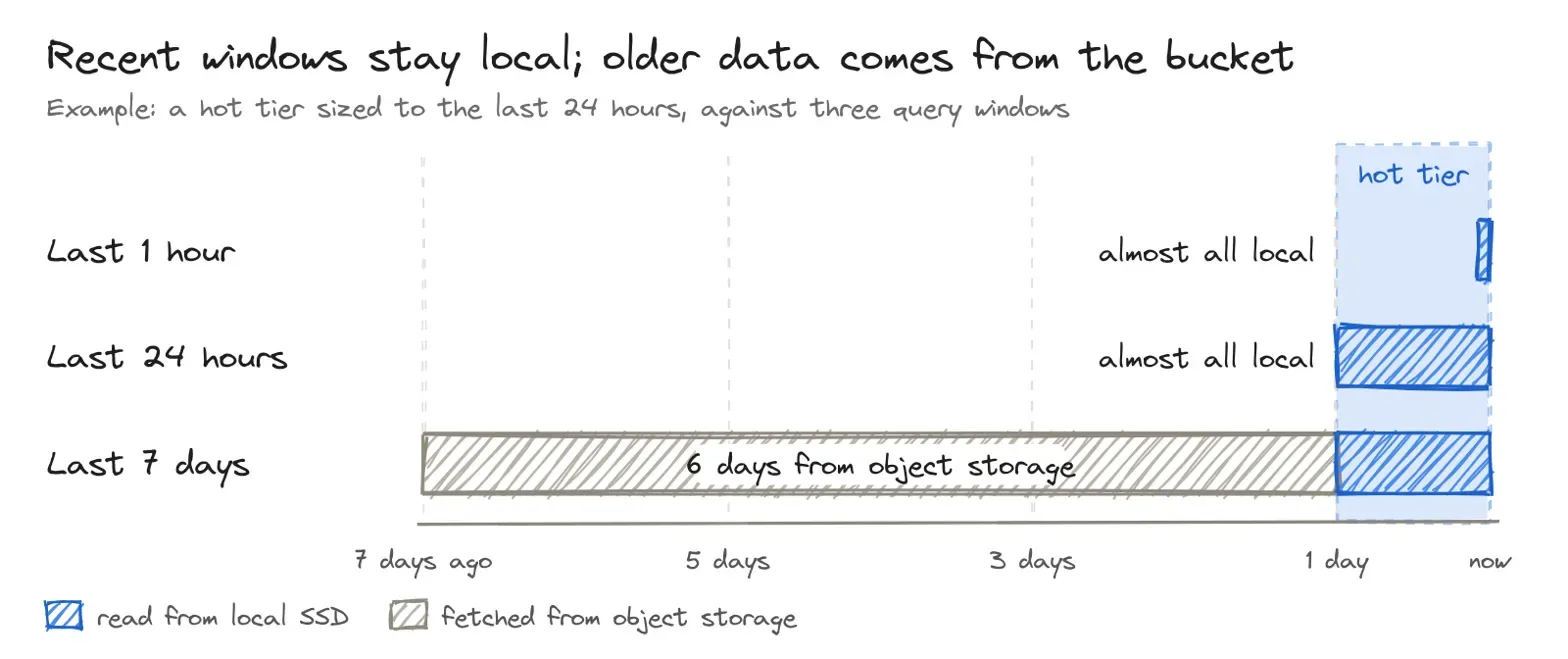
Queries do not have to be all-local or all-remote. When a query goes past the cache, as a seven-day query does with a 24-hour hot tier, recent files are read from local SSD and older files are fetched from the bucket, in the same query. The cache shortens the part of the query that's most likely to be repeated. One important note here is that newly ingested data is not in the hot tier until it has been committed to object storage and synced to the query node.
Same queries, two paths: bucket vs SSD
We have selected three queries that ask progressively more of the query node, ranging from virtually none to a filter and a group-by on a text column. Each one spans the last 24 hours of logs-dataset, a time interval that would be typical for a dashboard or an on-call engineer's needs:
-- 1. Count all rows
SELECT count(*) FROM "logs-dataset" OFFSET 0 LIMIT 500

-- 2. Count rows where the timestamp is set
SELECT count(*) FROM "logs-dataset" WHERE p_timestamp IS NOT NULL

-- 3. Errors grouped by message
SELECT "body_message", count(*) AS errors
FROM "logs-dataset"
WHERE severity_text = 'ERROR'
GROUP BY "body_message"
ORDER BY errors DESC
The first one does not do any work other than the data coming in, so it's just a measure of how fast data reaches the engine. The second one has to read the p_timestamp column and validate it for every row. The third one reads severity_text and body_message, filters on one, and groups on the other, and in addition, the body_message is free text, so it's the most expensive of the three.
We ran each query in three cache states on the querier:
| State | What's local | How we set it up |
|---|---|---|
| Cold | Nothing | No metadata cache and no hot tier |
| Warm | Parquet footers and row-group metadata in memory | P_PARQUET_METADATA_CACHE_SIZE set to 750MB, hot tier disabled |
| Hot | Footers in memory, 24hours of Parquet files on local SSD | Metadata cache at 750 MB, hot tier enabled on the dataset, synced and holding the last 24 hours |
Each state takes one class of request off the network. Here's where every request is served from:
| Request | Cold | Warm | Hot |
|---|---|---|---|
| Manifests (catalogue) | Bucket | Bucket | Bucket |
| Parquet footers | Bucket | Memory | Memory |
| Column chunks | Bucket | Bucket | Local SSD for files in the hot tier, bucket for older ones |
Cold is the S3 path from the beginning of this post. Hot is the path most real queries take. In our hot runs, the hot tier held the full 24 hours the queries asked for, so almost every column chunk was served from local SSD, and only the manifests went to the bucket. Warm is in between, and teaches us whether caching just the footers is sufficient.
Every query ran three times in each state, and we report the median.
| Query | State | Run 1 | Run 2 | Run 3 | Median | vs cold |
|---|---|---|---|---|---|---|
| Count all rows | Cold | 15.6 s | 14.0 s | 9.1 s | 14.0 s | - |
| Warm | 12.9 s | 9.1 s | 10.5 s | 10.5 s | 25% faster | |
| Hot | 3.8 s | 4.0 s | 3.5 s | 3.8 s | 73% faster | |
| Count where p_timestamp is set | Cold | 13.5 s | 12.5 s | 9.4 s | 12.5 s | - |
| Warm | 14.0 s | 11.7 s | 11.7 s | 11.7 s | 6% faster | |
| Hot | 5.1 s | 5.7 s | 4.3 s | 5.1 s | 59% faster | |
| Errors grouped by message | Cold | 47.1 s | 50.8 s | 48.4 s | 48.4 s | - |
| Warm | 48.2 s | 49.3 s | 50.5 s | 49.3 s | 2% slower | |
| Hot | 37.6 s | 35.3 s | 35.9 s | 35.9 s | 26% faster |
Here’s the same table as a picture. Each bar is a query’s median time as a share of its cold time, and the thin line shows the fastest and slowest run:
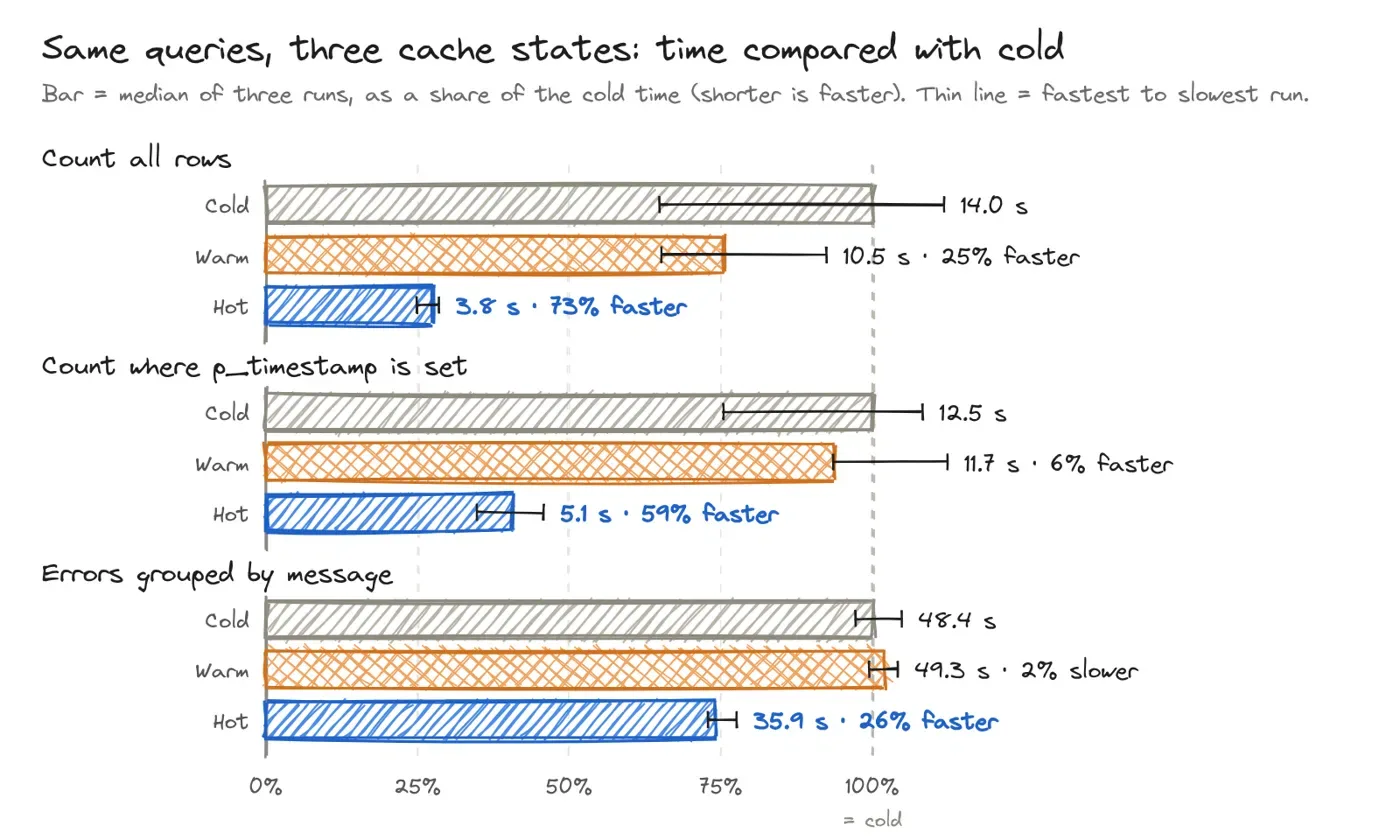
Where was the time spent
The key to success was copying the data over from S3 to the local SSD. With the hot tier enabled, queries that count all rows in the last 24 hours improved from 14.0 seconds to 3.8, which is a 73% improvement. The heaviest query, errors grouped by message, improved from 48.4 seconds to 35.9. Caching the footers alone didn't move any of the three queries outside the run-to-run noise.
Reading from SSD takes the wait out. Counting all the rows is nearly all the cost of getting that data to the engine, and the hot tier eliminates that. It also made runs consistent: cold runs of this query varied from 9.1 to 15.6 seconds, while hot runs varied from 3.5 to 4.0. Reading from the bucket introduces its variance into every query. Reading from local SSD doesn't.
Heavier queries keep their compute. The group-by saved us 12.5 seconds, but there was still almost 36 seconds left. This is the cost of decoding, filtering and grouping on a free-text column, which no cache would alleviate. The hot tier contained the entire 24 hours which these queries spanned, so there was no time spent waiting on the bucket for data; only the manifests were delivered from there. What is left is the work of the engine, which would be the same on any storage.
The metadata cache alone was lost in the noise. In the warm state, medians moved between 2% slower and 25% faster. The 25% is the simple count, and even there the warm runs (9.1 to 12.9 seconds) overlap the cold ones (9.1 to 15.6). And across the same query, cold runs varied by up to 6.5 seconds from one run to the next. A footer is one tiny read per file, and besides the column-chunk reads and the work done by the engine after, taking them away didn't make a difference at this scale. The footers aren't where the time is. The data is.
The timestamp count fell between. It needs to read the p_timestamp column across all rows, so it performs more operations than the simple count, but far less than the group-by. From SSD it took 4.3 to 5.7 seconds, versus 9.4 to 13.5 from the bucket, 59% faster.
Combined with where observability queries fall, this answers the question in the title. S3 is as slow as ever, but a query against the last day (which is most of them) reads from the SSD.
Sizing the cache
The next question that comes to mind is: how much SSD does each dataset need?
The answer isn't “enough for your retention”. It's “enough for the window most of your queries hit”. Our logs-dataset takes in about 12 million events a minute. Over the last 24 hours, that's 17.3 billion events and about 900 GB of Parquet, roughly 650 MB a minute. So a hot tier sized to the last 24 hours needs around 900 GB of SSD for this dataset.
These figures grow with your ingest volume, so focus on the rule of thumb rather than the exact numbers: check the time ranges your dashboards and alerts use, and size your hot tier accordingly. Anything outside that window remains in object storage and stays fully queryable; it just costs a round trip.
In our tests, that round trip cost about 10 seconds on the simple count (3.8 s hot against 14.0 s cold) and 12.5 seconds on the group-by.
The metadata cache is sized separately, in memory, with DataFusion's P_PARQUET_METADATA_CACHE_SIZE setting. Remember that footers are a small fraction of each file, so caching the footers for your common query windows will necessarily take up far less memory than the Smart Cache will take up on disk. The easiest way to size this is to actually measure it: configure a generous cache (say, 5 GB), run a query over the window that your team uses most often, and when the query is done, see how much of the cache the footers actually took up. Configure P_PARQUET_METADATA_CACHE_SIZE to that number, with a little headroom. For our 24-hour window, we ran with 750 MB.
Compare this to a system which maintains its primary data on the node. There, memory and local disk have to hold all the queryable data, plus at least one more copy for redundancy. In Parseable, local SSD holds only the recent slice, and only once. One practical note from the documentation: a dataset's hot-tier size can be increased but not decreased, so start small and grow it as needed.
Where cold still hurts
A cache is only useful when it's warm, and there are some particular circumstances where it's not.
- The first query after a restart. A query node which has just been restarted has an empty metadata cache in memory, and an empty hot tier until it syncs. The first few queries will pay the full object-storage latency.
- A new query node. When you scale out into new compute nodes, it adds capacity right away, but each new node is cold when it joins. Stateless architecture is good for scale, but it will not make the first minute any faster.
- Long-range queries over old data. A 30-day investigation, or a quarterly report, will reach far beyond any reasonable hot tier. These long-tail queries will pay the object-storage latency on most of their files, by design.
- Manifests, every time. Even a fully-warm query has to read its manifests from the bucket. At one manifest per ingestor per day, it's not a huge cost, but it means no query is completely free of object-storage latency.
There are ways to mitigate each: size the hot tier and metadata cache to your team's working window, narrow time ranges where possible, and keep files large enough that the request count stays low.
That last one is worth a post of its own. At one file per minute, a week's worth of this dataset is 10,000 files, each of which incurs at least one request on a cold query. File size is a less obvious lever than caching, but it moves the same number.
So, is S3 too slow?
Object storage is slow per request. That part of the objection is true, and no architecture changes the physics from the start of this post. What an architecture can change is how often a query has to go to the bucket for its data.
In Parseable, the bucket is for keeping data safe, and the node is for answering quickly. Each does one job. The bucket is your only copy that needs to survive. The query node keeps a disposable copy of the latest data, the part most queries ask for, on local SSD, and that's where they read it from. Lose the node, and you lose speed until the cache fills again. You never lose data.
Systems that keep their primary data in memory or on local disk make the opposite trade: every read is fast, but every byte has to be on the node twice.
A Parseable query node is stateless, but it is not dumb: it maintains the latest data in its local SSD. The Smart Cache contains the last few hours or days of each dataset, which is what the majority of observability queries are asking about. The only durable copy of the data in your Parseable stack lives in the object store, but the majority of data that you query is read from the SSD.