
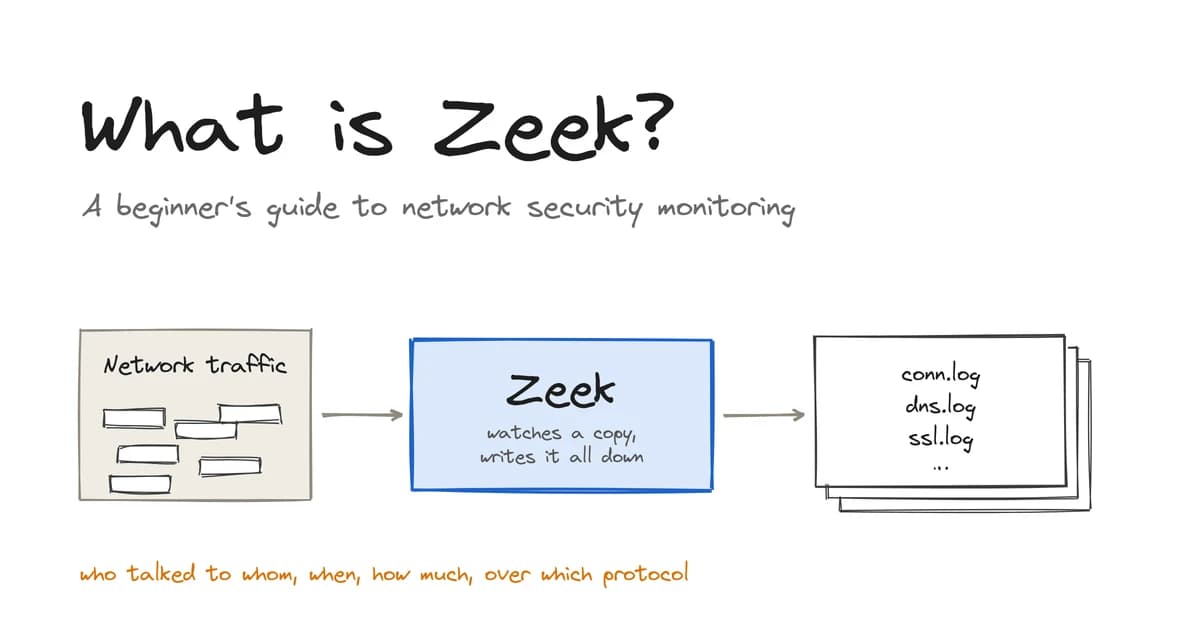
Zeek is an open-source, free network security monitoring tool. It monitors network traffic and logs all communications between hosts in a structured format. This includes who was communicating, when, for how long, how much data was sent and the protocol used.
It doesn’t store the traffic and does not restrict any traffic. It just can log what happened in a readable format.
This is different to most security tools that someone would come across as a beginner. A firewall would decide what is allowed, and an alerting tool would look for known attacks. Zeek just logs everything so that you can ask questions about the traffic. These could be questions that you wouldn’t have thought of whilst the traffic was happening.
This guide explains how Zeek works, where it runs, what it logs, how it differs from Suricata and Snort and how to run it on your own traffic. It includes commands you can copy and run.
What is Zeek?
Zeek is a passive network monitoring tool that parses packets and creates logs (one per protocol), allowing you to see what all the machines on your network were doing.
Little history
Zeek began in the mid-90’s as a research project by Vern Paxson at Lawrence Berkeley National Laboratory. It was originally called Bro but was renamed to Zeek in 2018. It is actively developed in an open community and has its own community and conference each year. Bro is the same tool that you will find in older blog posts/scripts.
How Zeek works
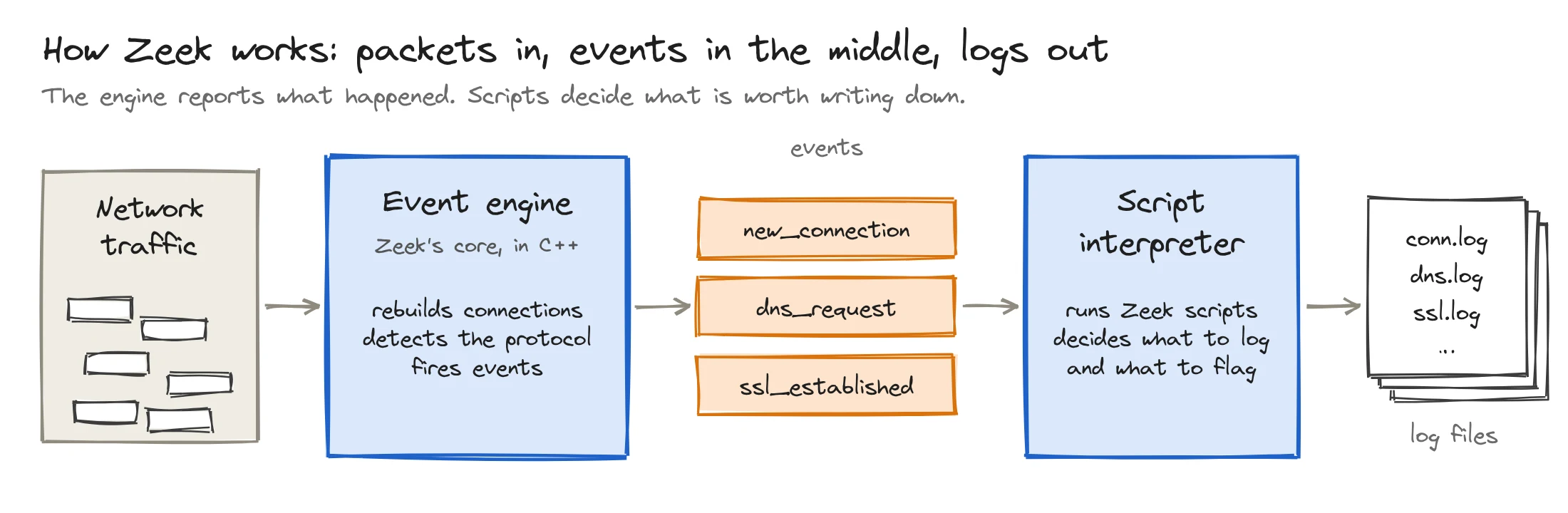
Zeek has two layers: an event engine that understands traffic, and a script interpreter that decides what to do about it.
Event engine
Zeek's event engine is written in C++. It takes packet streams and reassembles them into connections, then identifies the protocol in use (DNS, HTTP, TLS, SSH, etc.) from the traffic itself.
The event engine will convert this into an event. A new connection has started, there has been a DNS query for this domain, and a TLS handshake has completed with this certificate. The event engine makes no judgements; it simply reports.
Script interpreter
All events are passed to Zeek scripts. These scripts determine what gets logged, counted and reported. They are written in Zeek’s own language.
The logs you will see later in this post are scripts that come with Zeek. They can be modified or added to. This is what makes Zeek different to other tools; it is a programmable platform.
Log files
This produces a log file for each protocol/topic. By default, these are text files with a header and tabs. However, most teams will change this to JSON as it’s easier for other tools to read. We will do both in the hands-on section.
Where Zeek runs on a network
Zeek runs on a machine called a sensor. The sensor sits beside the network, not in its path, and is sent a copy of the traffic.
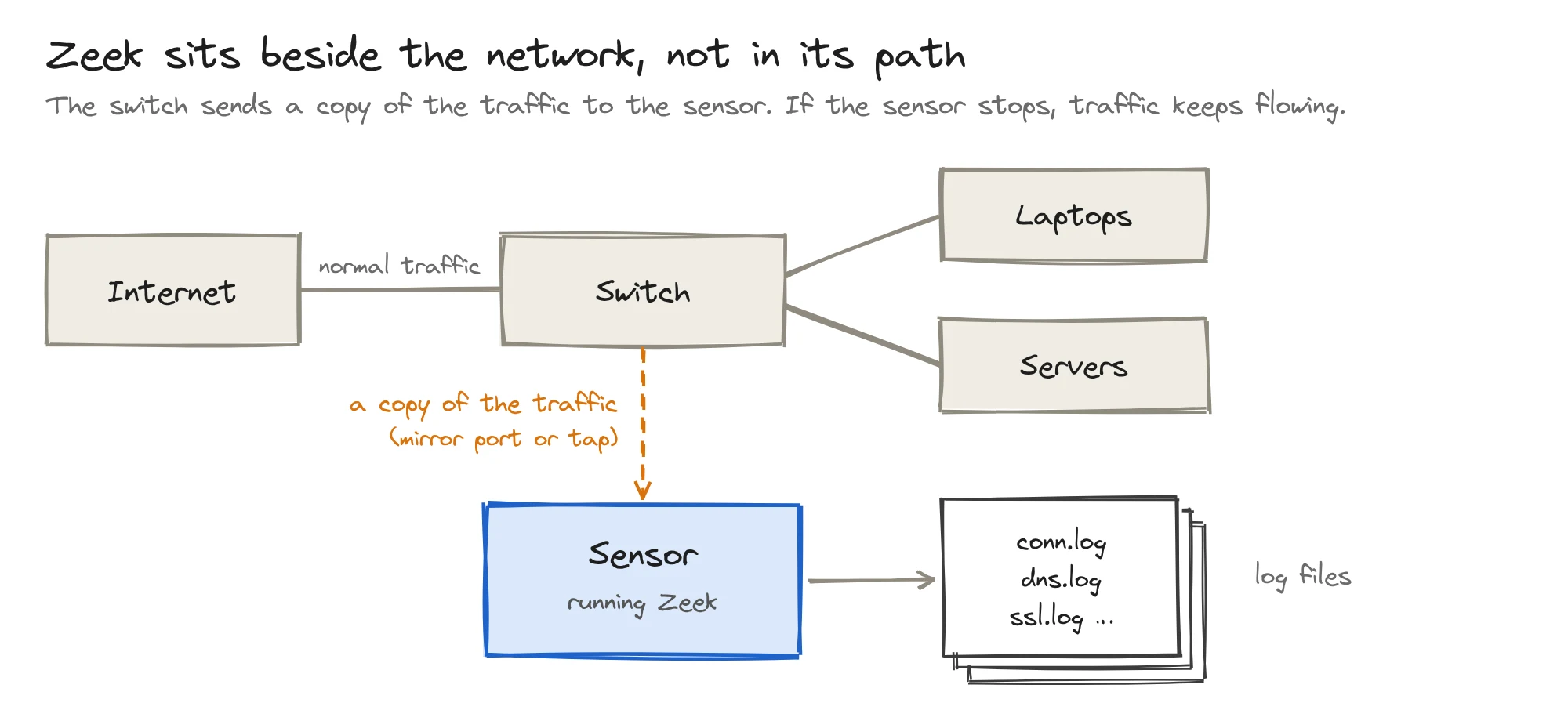
The two common methods for doing this are:
- Mirror port (or SPAN port). This is a setting on your network switch to mirror the traffic from other ports onto one port. Your sensor would plug into this port.
- Network tap. This is a small piece of hardware that sits on a cable and mirrors everything on it.
As Zeek is only seeing a copy of the traffic, there is no impact on the network speed or performance. If the sensor goes offline, the traffic will still flow, but you will just not receive any logs.
A sensor can be a physical server, virtual machine or cloud instance. For learning purposes, we can use our own laptop as a sensor. We will capture some traffic to a file and allow Zeek to read the file.
Zeek vs Suricata vs Snort
Suricata and Snort are signature-based detection tools, while Zeek is a passive logging tool that lets you decide what to do using your own scripts. This means they answer different questions, and many teams will use Zeek alongside either Suricata or Snort.
| Zeek | Suricata | Snort | |
|---|---|---|---|
| Approach | Protocol analysis plus scripts | Signature rules, plus protocol logging | Signature rules |
| Main output | Many structured logs, one per protocol | Alerts and protocol records in one JSON stream (eve.json) | Alerts |
| Can it block traffic? | Not inline. Its NetControl framework can ask other devices to block. | Yes, when run inline as an IPS | Yes, when run inline as an IPS |
| Custom logic | A full scripting language | Rules, plus Lua scripts | Rules, plus Lua plugins in Snort 3 |
| Best at | Recording what happened, for hunting and investigation | Catching known threats, fast | Catching known threats |
| Maintained by | The Zeek project | The Open Information Security Foundation (OISF) | Cisco Talos |
Suricata and Snort are intrusion detection systems, whereas Zeek is a logging system. The former alert you when traffic matches a rule. Zeek's logs show what happened before and after, including activity that no rule covers yet.
Zeek logs explained
Each protocol or subject has its own log file. You will most commonly see:
| Log | What each line records |
|---|---|
conn.log | One network connection: who, to whom, which port, how long, how many bytes, how it ended |
dns.log | One DNS lookup: the name asked for and the answer |
http.log | One HTTP request: host, URL, method, status code, user agent |
ssl.log | One TLS (encrypted) connection: TLS version, the server name the client asked for |
x509.log | One certificate seen in a TLS handshake: subject, issuer, validity dates |
files.log | One file seen moving over the network: type, size, hashes |
notice.log | Something a Zeek script decided is worth a human's attention |
weird.log | Traffic that does not follow the protocol rules, often harmless, sometimes not |
Only a log will be created if there is this type of traffic. If there is no clear text HTTP on the network then the http.log will be empty or not present.
The uid ties it all together
Every connection has a unique identifier, known as the uid. The uid appears in each log that describes that connection.
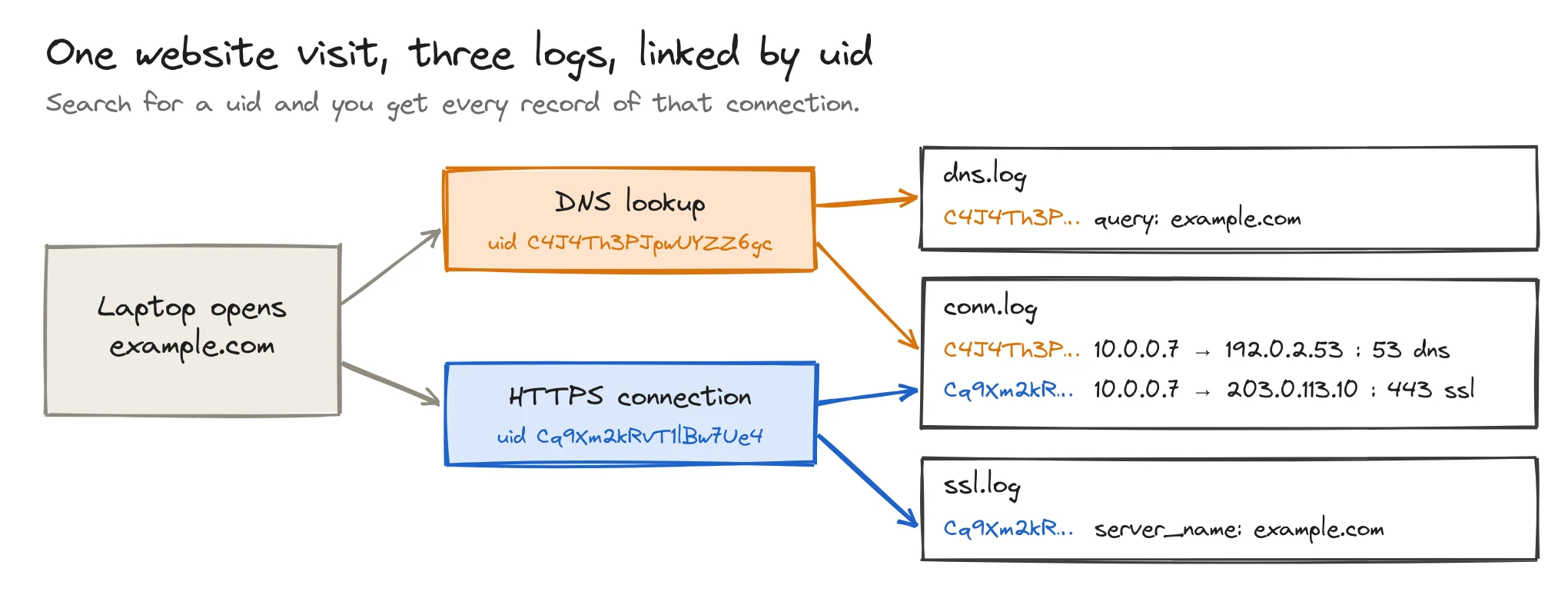
If a laptop connects to an HTTPS website then there will be one entry in conn.log for the connection, and another in ssl.log for the TLS handshake. Both will have the same uid. The DNS query will have its own connection with a separate uid, so there will also be an entry in conn.log and dns.log.
If you notice something strange in one log, search for the uid to find every other entry related to that connection.
How to install Zeek
The quickest way to try Zeek on any operating system is Docker, which is what we use below. The Zeek project publishes zeek/zeek:lts (long-term support) and zeek/zeek:latest on Docker Hub.
docker pull zeek/zeek:ltsFor a real sensor, use the official Linux packages, which install under /opt/zeek. On macOS, brew install zeek also works. The install guide lists every option.
Hands-on: run Zeek on your own traffic
You need Docker and tcpdump, which comes with macOS and most Linux distributions. Only capture traffic from your own machine or a network you are allowed to monitor.
Step 1: capture some traffic
Record from your network interface (on a Mac, Wi-Fi is usually en0), open a few websites, then stop it with Ctrl+C.
sudo tcpdump -i en0 -w lab.pcap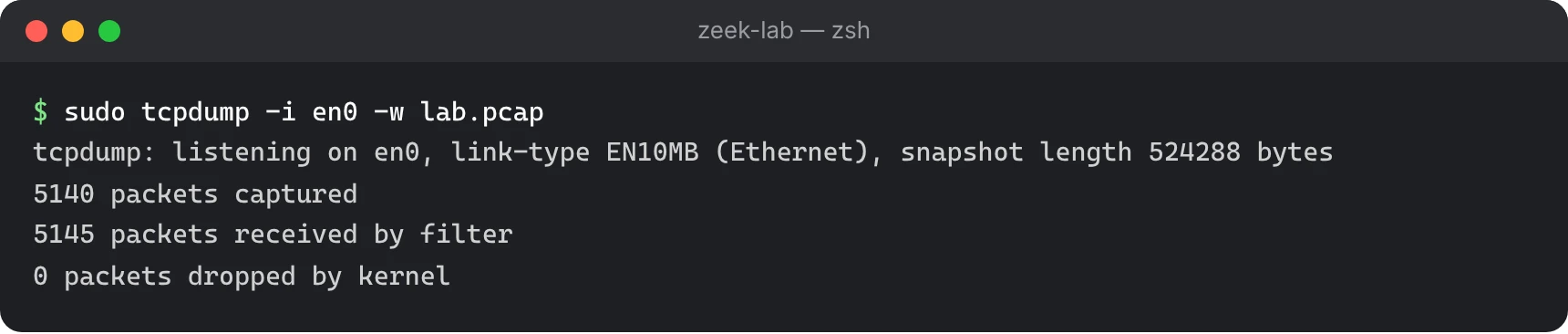
Step 2: run Zeek on the capture
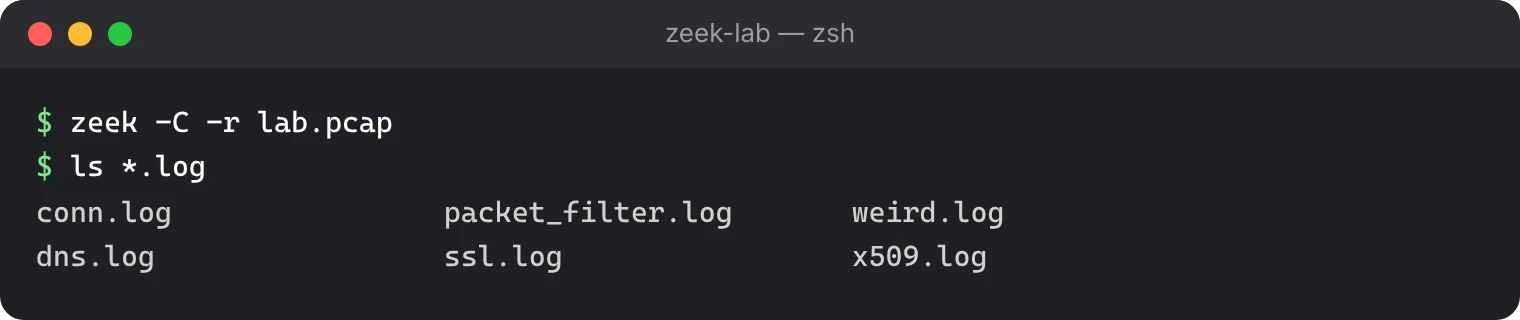
Open a shell in the Zeek container from the folder that holds lab.pcap, then point Zeek at the file:
docker run --rm -it -v "$PWD":/data -w /data zeek/zeek:lts bash
zeek -C -r lab.pcap
ls *.log
-r reads a file instead of a live interface. -C ignores bad checksums, which are normal when you capture on the machine that sent the traffic. Our 30-second capture was 5.1 MB; the logs Zeek wrote from it came to 72 KB.
Step 3: read conn.log
zeek-cut, which ships with Zeek, picks out the columns you name:
zeek-cut id.orig_h id.resp_h id.resp_p service duration conn_state < conn.log | head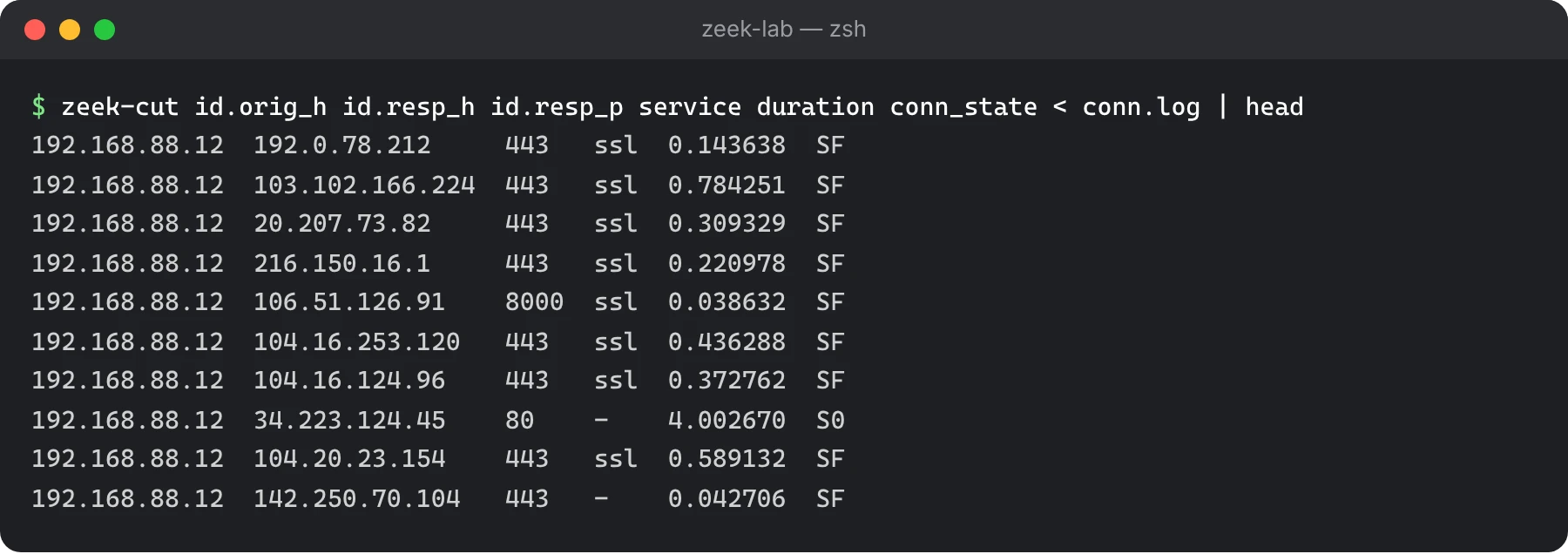
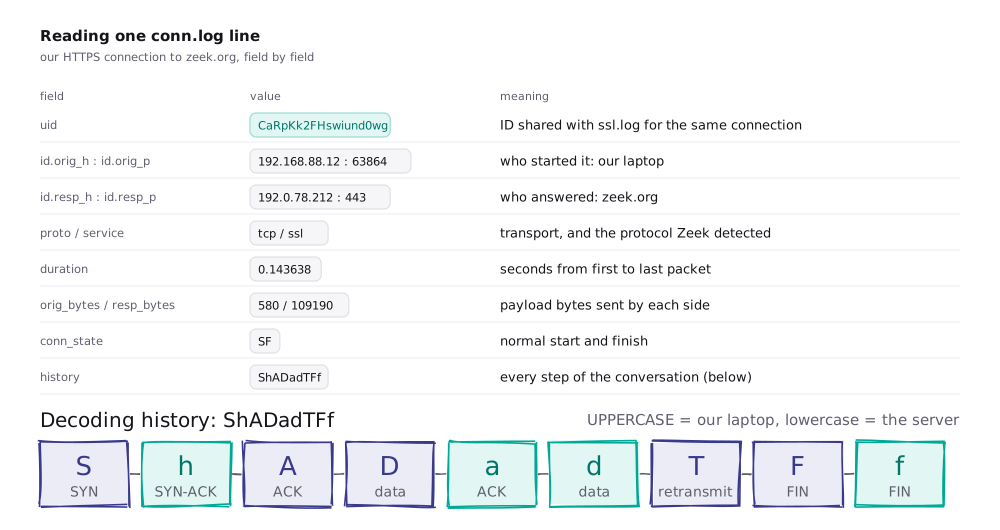
service is the protocol Zeek detected from the traffic itself. conn_state says how the connection went: SF is a normal start and finish, S0 is an attempt that got no reply, and REJ is an attempt that was refused.
Step 4: follow one connection across logs
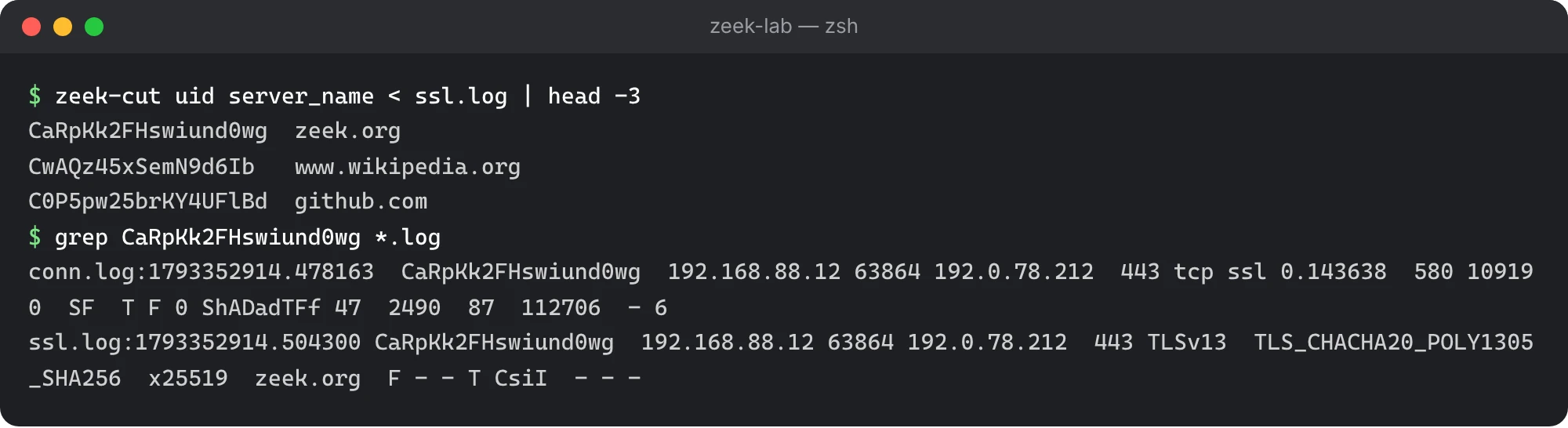
Copy any uid from ssl.log and search every log for it:
zeek-cut uid server_name < ssl.log | head -3
grep <uid> *.log
The same uid appears in conn.log and ssl.log: two views of one connection.
To get JSON instead of tab-separated logs, run zeek -C -r lab.pcap LogAscii::use_json=T.
Log analysis with zeek-cut
Most day-to-day Zeek work is zeek-cut plus standard Unix tools. Three examples:
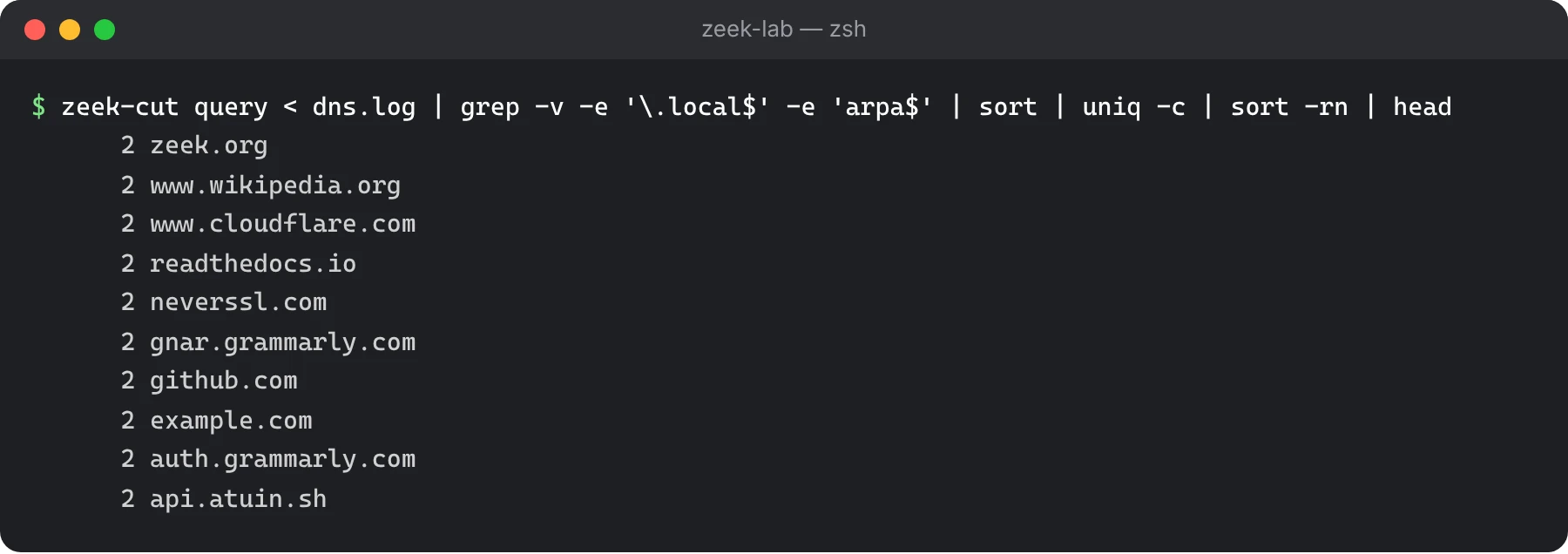
Most looked-up domains
zeek-cut query < dns.log | grep -v -e '\.local$' -e 'arpa$' | sort | uniq -c | sort -rn | headOn a home or office network, much of dns.log is multicast DNS: .local names that phones, printers and laptops use to find each other. The grep drops those, and reverse lookups ending in arpa, so the real domains show.
Connection attempts that got no reply
zeek-cut id.orig_h id.resp_h id.resp_p conn_state < conn.log | awk '$4 == "S0"' | headMany S0 attempts from one machine to many addresses can mean scanning.
Domains that do not exist
zeek-cut query rcode_name < dns.log | awk '$2 == "NXDOMAIN"' | sort | uniq -c | sort -rn | headSome malware tries random domain names until one answers, which leaves a trail of failed lookups.
Writing your first Zeek script
Scripts are what make Zeek programmable. A script reacts to events from the event engine. Save this as hello.zeek:
event new_connection(c: connection)
    {
    print c$id$orig_h, c$id$resp_h, c$id$resp_p;
    }
Then run it against the same capture:
zeek -C -r lab.pcap hello.zeek | headEach time the engine sees a new connection, it fires new_connection, and the script prints who connected to whom on which port. c$id$orig_h reads the originator's address from the connection record.
Zeek frameworks and packages
Zeek ships with frameworks, ready-made building blocks that scripts use:
| Framework | What it does |
|---|---|
| Notice | Raises findings for a human and writes them to notice.log |
| Intelligence | Matches traffic against lists of known-bad IPs, domains, URLs or file hashes |
| File analysis | Pulls files out of traffic and hashes them |
| NetControl | Asks other devices, such as a firewall, to block an address |
Community scripts and protocol analysers are shared as packages, installed with zkg install <package-name>. Browse them at packages.zeek.org.
Real-world use case: spotting beaconing
Malware will often communicate with their operators server at regular intervals. For example every 60 seconds. This is known as beaconing.
This command will find 2 machines that communicate at very regular intervals. It will print the jitter (the amount of variation in the interval in seconds), average interval, number of connections and source, destination and port. The most regular pairs will be at the top of the results.
zeek-cut ts id.orig_h id.resp_h id.resp_p < conn.log \
  | sort -k2,2 -k3,3 -k4,4 -k1,1n \
  | awk '{ key = $2" "$3" "$4
           if (key == prev) { gap = $1 - last; n[key]++; s[key] += gap; ss[key] += gap*gap }
           prev = key; last = $1 }
         END { for (k in n) if (n[k] >= 10) { m = s[k]/n[k]; sd = sqrt(ss[k]/n[k] - m*m)
                 printf "%.1f\t%.1f\t%d\t%s\n", sd, m, n[k]+1, k } }' \
  | sort -n | head
Run for longer than 2 hours. Two minutes is not enough. Updaters, chat applications and monitoring agents have their own timer to call home, so if you have a consistent pair of calls you should investigate.
What Zeek is not
Zeek doesn’t do the following things.
- It isn’t a firewall. It sits on the side of the network, and will never drop any packets. You can use NetControl to tell a firewall to block, but it’s not really its purpose.
- It isn’t a signature based alert. You can get alerts, but Suricata and Snort are designed to detect known attacks using a rule base.
- It isn’t a logging or searching tool. Zeek will produce logs and rotate them. If you want to keep logs for months and search them you need another system.
- It can’t decrypt anything. With TLS Zeek will know who spoke, when, how much and TLS version, but it won’t know what pages or data was sent. Modern browsers can also encrypt the server name (Encrypted Client Hello) so this won’t be known either.
- It won’t scale. A single Zeek process won’t be able to cope with a busy enterprise connection. Large sites will run Zeek as a worker cluster using
zeekctl. You should also think about how big yourconn.logwill be.
Final thoughts
Zeek records network activity without deciding whether it is good or bad. You can query those logs later, including for threats that were unknown when the traffic occurred, such as an address or domain identified as malicious weeks later.
The practical steps cover the core of daily Zeek analysis: reading conn.log, connecting records by uid and investigating anomalies.