
Temporal
Observe Temporal workers and Temporal Cloud in Parseable
Temporal is a durable execution platform for workflows and applications. Parseable can observe both sides of a Temporal deployment: workflow and activity telemetry emitted by your workers and service metrics exposed by Temporal Cloud.
Use Parseable's Temporal middleware plugins to send workflow and activity logs and traces directly from your workers. Temporal SDK metrics can also be scraped from each worker and sent to Parseable with Prometheus Remote Write.
Pick your SDK below to install the plugin. Continue through this page for the shared event schema, queries, dashboards and operational caveats.
Worker telemetry
Parseable provides middleware plugins for Temporal that ship workflow and activity execution events to a Parseable instance as OpenTelemetry logs and traces. Temporal SDKs can also expose worker and client level metrics, which can be scraped by Prometheus and forwarded to Parseable through Prometheus Remote Write.
Drop the Parseable plugin into a worker and every workflow run produces:
- A flame-graph trace of the run, including child workflows and activity calls.
- A flat, queryable log schema with
workflow_id,activity_name,attempt,duration_ms,status,error, etc. - Custom domain events via a replay-safe
workflowEvent()/workflow_event()helper - useful for AI agents and multi-step orchestrators that want to emit "tool called", "plan chosen", "step started" alongside Temporal's built-in lifecycle events.
For metrics, enable Temporal SDK telemetry on the worker or client process and expose the Prometheus endpoint from that process. Prometheus can then scrape those metrics and remote write them into a metrics dataset in Parseable.
Pick your SDK
| SDK | Package | Install guide |
|---|---|---|
| TypeScript | @parseable/temporal | TypeScript |
| Python | temporal-parseable | Python |
| Java | temporal-parseable | Java |
All three plugins emit the same log schema and OTLP trace format, so dashboards, alerts and SQL queries are portable across workers in different languages.
What gets captured
- Workflow lifecycle -
started,completed,failedrecords withduration_ms,workflow_id,run_id,workflow_name. - Activity lifecycle - per-attempt
started/completed/failedrecords withactivity_name,activity_id,attempt,duration_ms. Retries produce one record per attempt. - Signals, queries, updates - inbound message records.
- Child workflows, outbound signals, continue-as-new - outbound message records (
direction: 'outbound'). - Custom user events via the
workflow_eventhelper. - OpenTelemetry trace spans -
RunWorkflow:*,StartActivity:*,RunActivity:*emitted by Temporal's official OTel instrumentation, sanitized for OTLP-strict ingest.
All workflow-side emission is replay-safe: every plugin guards emission so workflow records and user events are not duplicated when Temporal replays history (worker recovery, cache eviction, manual replay). Verified by automated replay tests in each SDK.
Endpoints
Logs are POSTed to ${endpoint}/v1/logs; traces to ${endpoint}/v1/traces. The two pipelines are independently configurable - disable either layer per-SDK (logs: false, traces: false, logs=None, etc.).
Streams default to temporal-logs and temporal-traces. Let the OTLP ingest path create these datasets on first write or make sure any existing dataset matches the signal type. temporal-logs should be a logs dataset and temporal-traces should be a traces dataset.
Do not create temporal-traces as a plain log dataset through the logstream API. Trace records should arrive through /v1/traces so Parseable stores them as traces.
Metrics follow a separate Prometheus path. Temporal exposes SDK metrics from the worker or client process, Prometheus scrapes that endpoint and Parseable receives the samples through POST /v1/prometheus/write.
Temporal Worker or Client
  |
  | Prometheus scrape
  v
Prometheus
  |
  | remote_write
  v
Parseable /v1/prometheus/write
  |
  +--> temporal-metrics
Example Prometheus remote write configuration:
scrape_configs:
  - job_name: temporal-worker
    static_configs:
      - targets: ['temporal-worker:9464']

remote_write:
  - url: "https://<parseable-host>:8000/v1/prometheus/write"
    authorization:
      type: Bearer
      credentials: <parseable-api-key>
    headers:
      X-P-Stream: temporal-metrics
Temporal SDK metrics include worker activity, workflow task execution, activity execution, task queue polling, schedule-to-start latency and end-to-end workflow execution latency. The exact metric names depend on the SDK and the Temporal runtime path being used, so use Temporal's official SDK metrics reference when deciding what to dashboard.
To validate the setup, run a workflow and check three places in Parseable:
temporal-logsshould show workflow, activity, signal, query, update and custom event records.temporal-tracesshould show workflow and activity spans for the run.temporal-metricsshould show SDK metrics after Prometheus scrapes the worker or client process and remote writes to Parseable.
View in Parseable
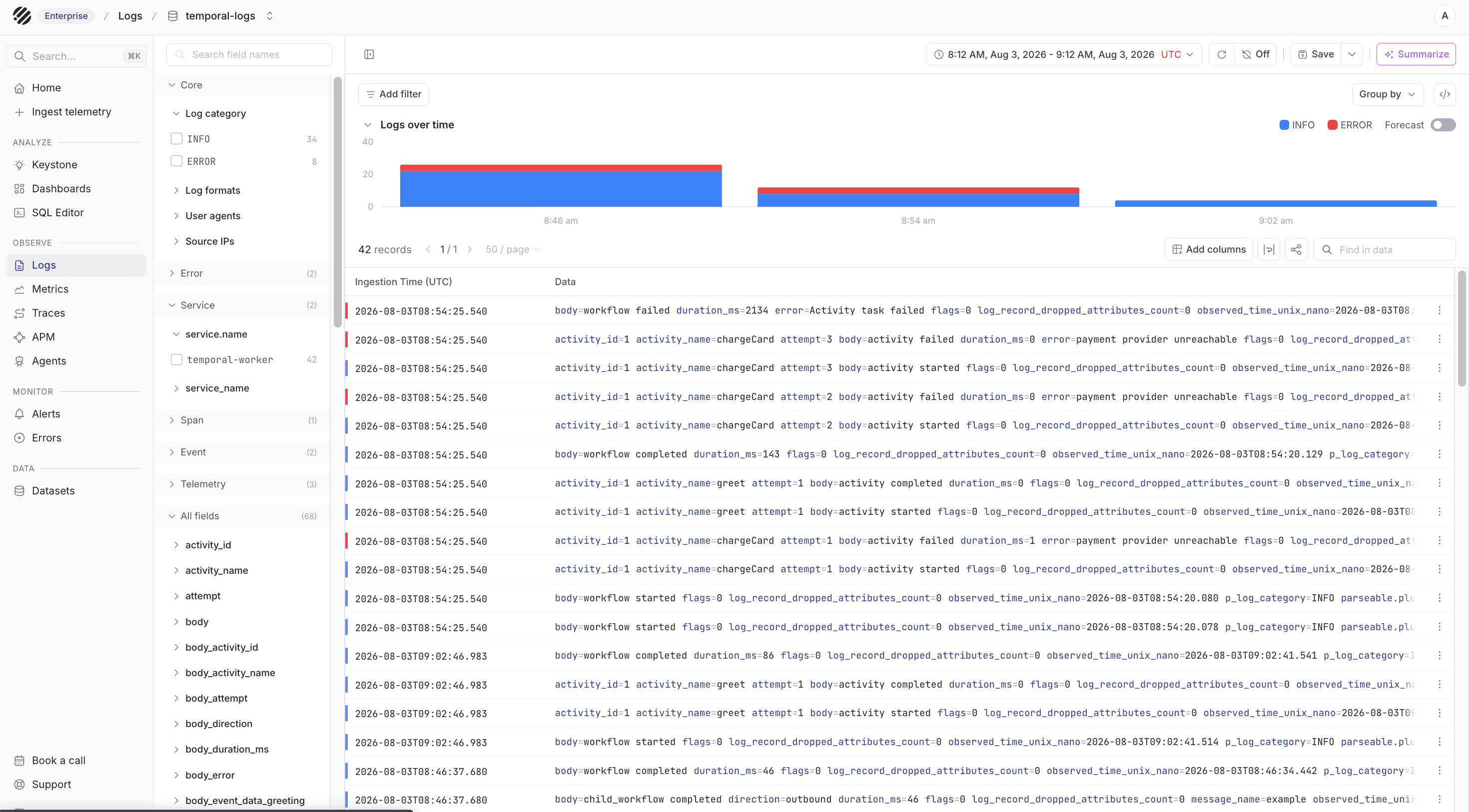
Once the worker starts exporting data, each signal lands in its own dataset. Start with the Logs page when you want a flat event view of workflow and activity lifecycle records. This is useful for filtering by workflow_id, activity_name, status or error.
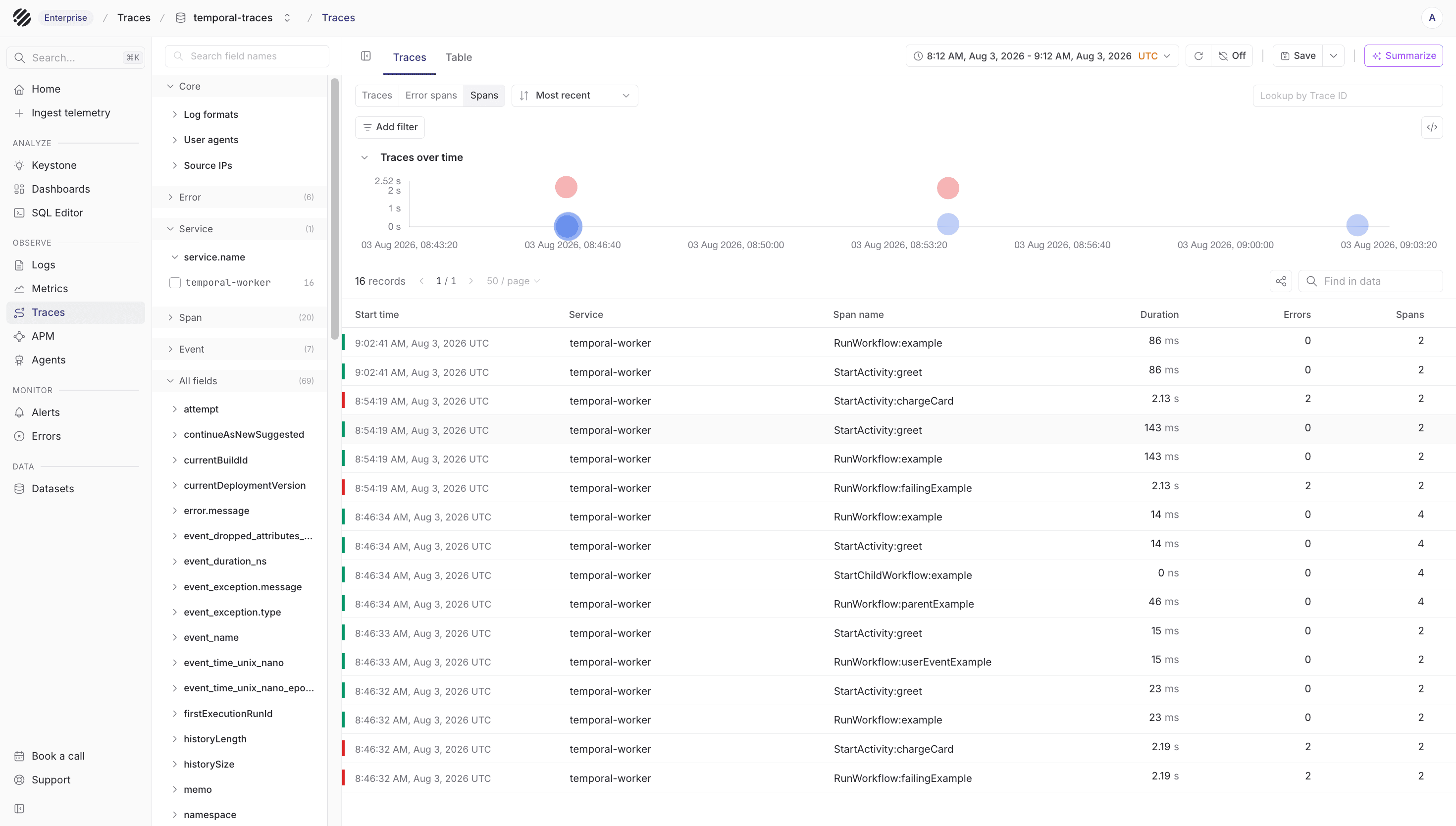
Use the Traces page when you want to follow a workflow run as spans. This gives you the execution shape of the run, including workflow spans, activity spans, child workflow calls and timing.
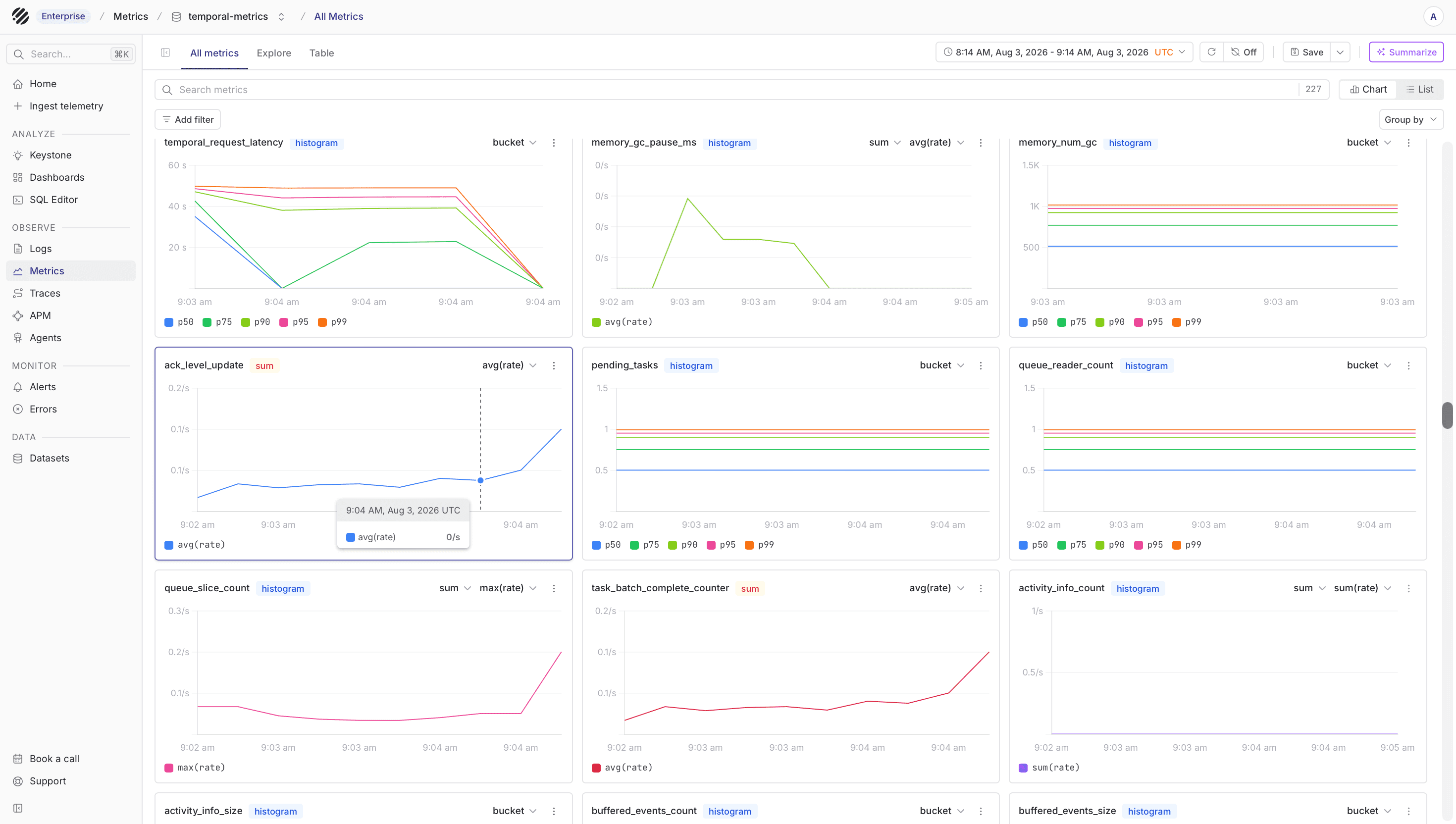
Use the Metrics page for Temporal SDK metrics collected through Prometheus. This is where worker, workflow task, activity, polling and latency metrics show up after Prometheus remote writes them into Parseable.
Log schema
All three SDKs write to one log stream (default temporal-logs). Records share a common envelope with fields specialized by type:
| Field | Type | Notes |
|---|---|---|
type | 'activity' | 'workflow' | 'user_event' | 'signal' | 'query' | 'update' | 'child_workflow' | 'continue_as_new' | discriminator |
status | 'started' | 'completed' | 'failed' | omitted on user_event |
service_name | string | from plugin config |
timestamp | ISO 8601 string | event time |
workflow_id | string | |
run_id | string | |
workflow_name | string | |
activity_name | string | activity records only |
activity_id | string | activity records only |
attempt | number | activity records only |
duration_ms | number | on completed/failed |
error | string | on failed |
direction | 'inbound' | 'outbound' | message records only |
message_name | string | message records only |
target_workflow_id | string | outbound signals/child workflows |
event_name | string | user events only |
event_data | object | user events only |
All logs and traces carry a parseable.plugin.version resource attribute so consumers can correlate behaviour with plugin releases.
Trace spans are emitted by Temporal's official OTel instrumentation - see the Temporal observability docs for the span schema.
Example queries
Failure rate per activity over the last hour:
SELECT activity_name,
       COUNT(*)                                          AS attempts,
       SUM(CASE WHEN status = 'failed' THEN 1 ELSE 0 END) AS failures,
       1.0 * SUM(CASE WHEN status = 'failed' THEN 1 ELSE 0 END) / COUNT(*) AS failure_rate
FROM "temporal-logs"
WHERE type = 'activity'
  AND status IN ('completed','failed')
  AND p_timestamp > now() - INTERVAL '1 hour'
GROUP BY activity_name
ORDER BY failure_rate DESC;
p95 workflow duration by workflow type:
SELECT workflow_name,
       APPROX_PERCENTILE_CONT(duration_ms, 0.95) AS p95_ms
FROM "temporal-logs"
WHERE type = 'workflow'
  AND status = 'completed'
GROUP BY workflow_name;
Trace a single workflow run (correlate logs with the trace stream):
SELECT timestamp, type, status, activity_name, attempt, duration_ms, error
FROM "temporal-logs"
WHERE workflow_id = '<workflow_id>'
ORDER BY timestamp;
Dashboards
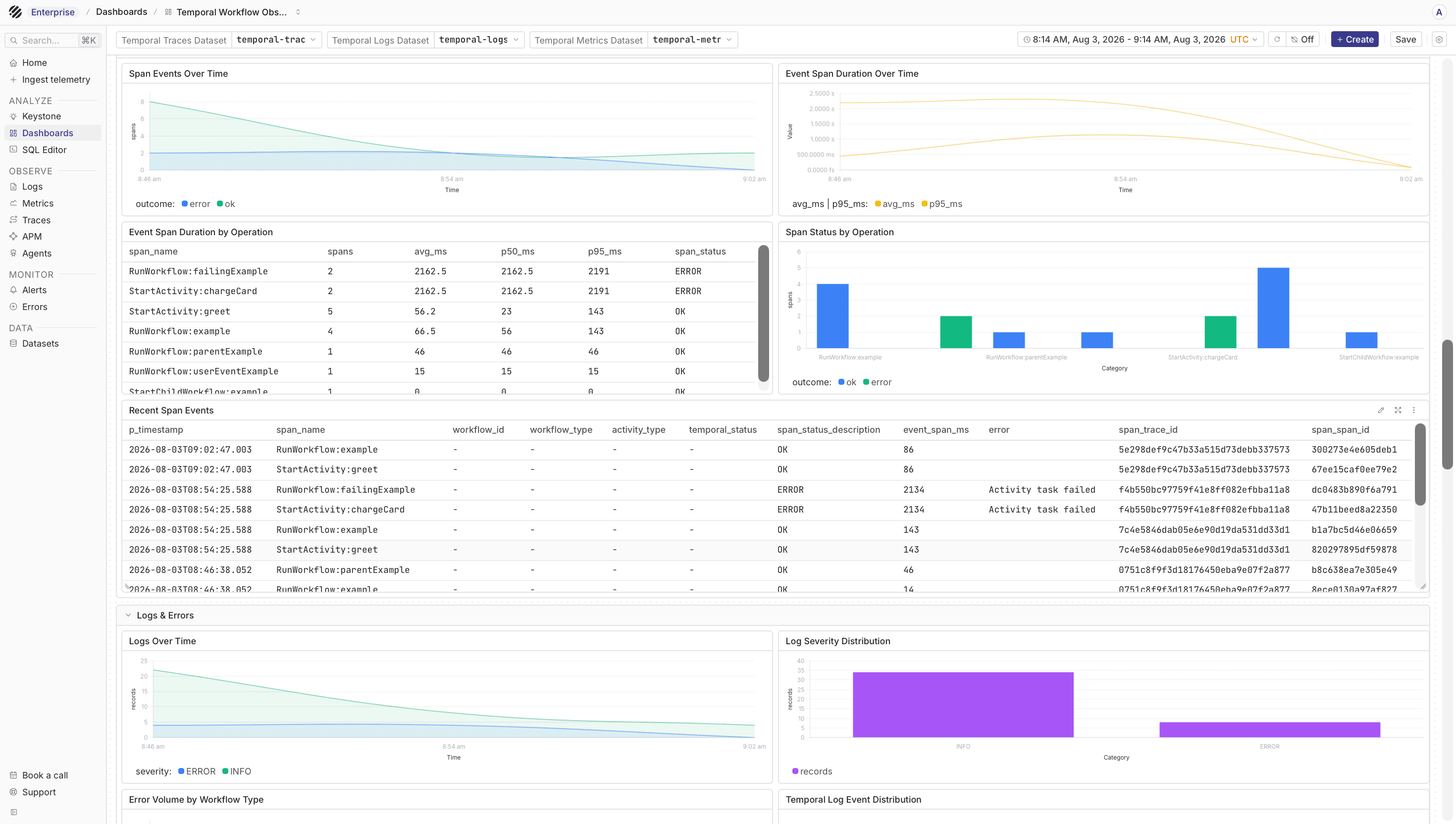
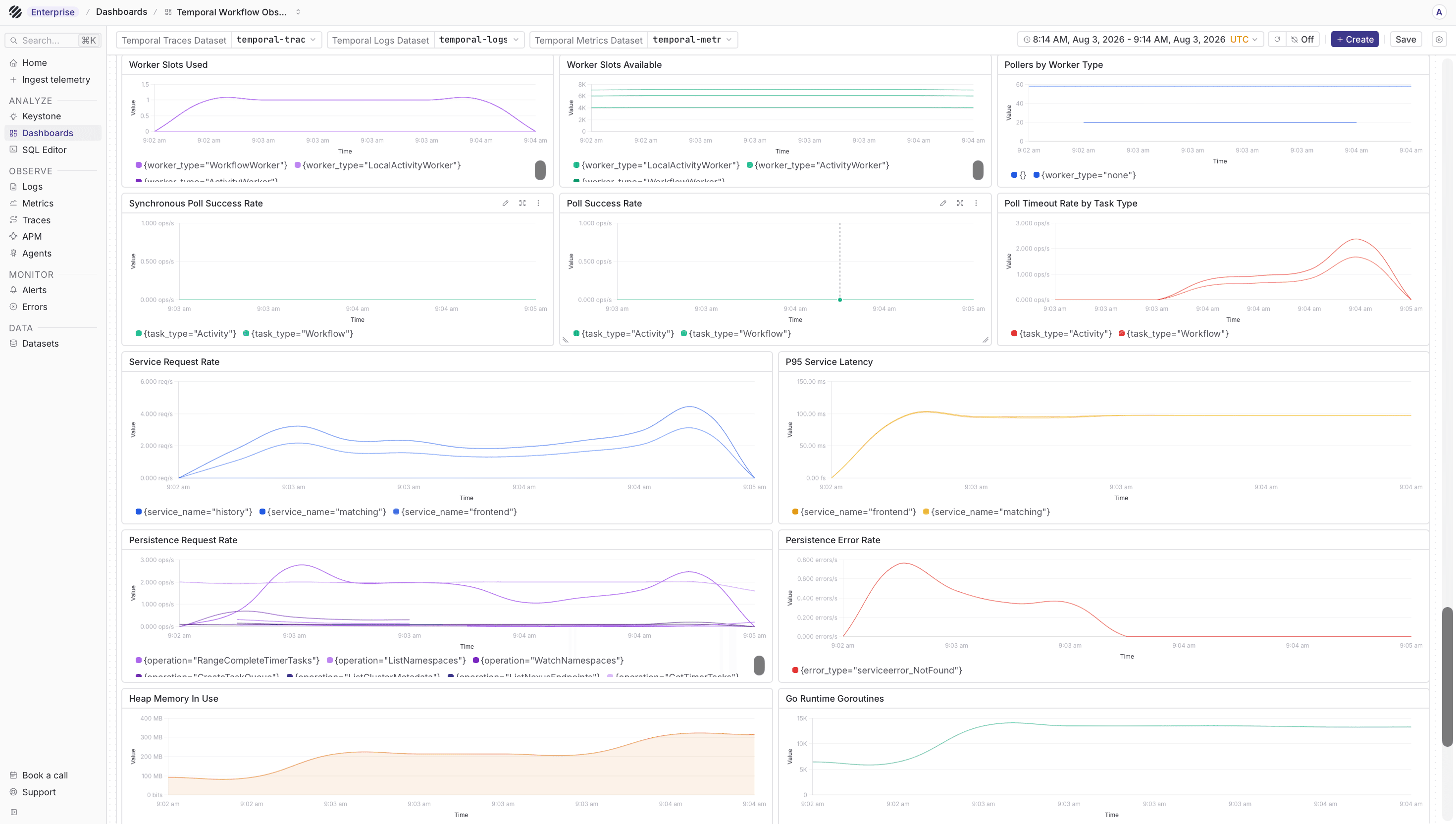
After logs, traces and metrics are flowing, you can use dashboards to keep the main workflow signals in one place. Parseable provides a Temporal workflow observability dashboard in parseablehq/dashboards. Use it as a starting point, then update dataset names and queries for your Temporal deployment.
The spans dashboard helps you look at workflow and activity execution across runs without opening each trace manually.
The metrics dashboard gives you a quick way to watch SDK level worker and workflow metrics after Prometheus starts forwarding them to Parseable.
Caveats (apply to all SDKs)
- Throw
ApplicationFailurefor graceful handler failures. Signal/update handlers that throw a plainError/Exceptionare treated by Temporal as a workflow-task failure: the task is retried until it succeeds and the plugin emits onestarted+failedrecord pair per retry. ThrowApplicationFailurewithnonRetryable: true(TypeScript) or raiseApplicationFailure(non_retryable=True)(Python) instead - the interceptor records exactly onefailedevent and the error propagates to the client as an update failure rather than a task failure. child_workflowcompletion is tracked from the child, not the start RPC. The outbound interceptor wraps the result promise sostatus: 'completed'(orfailed) fires when the child actually finishes - not when the start call returns. Start-time RPC errors and run-time child failures are reported with distinctfailedrecords.- OTel SDK pinned to 1.x. Temporal's OTel plugin pins the 1.x line; the Parseable plugins follow until Temporal moves to 2.x.
- Empty-body warning on OTLP success is benign. Parseable returns HTTP 200 with an empty body for accepted OTLP payloads. OTel's deserializer logs
Export succeeded but could not deserialize response - is the response specification compliant?atDEBUGlevel only.
Links
- TypeScript plugin: github.com/parseablehq/temporal-plugin
- Python plugin: github.com/parseablehq/temporal-plugin-python
- Java plugin: github.com/parseablehq/temporal-plugin-java
Temporal Cloud publishes account and namespace metrics through an OpenMetrics endpoint. Run an OpenTelemetry Collector to scrape that endpoint and export the metrics to Parseable over OTLP/HTTP:
Temporal Cloud /v1/metrics
  |
  | OpenMetrics scrape
  v
OpenTelemetry Collector
  |
  | OTLP/HTTP
  v
Parseable /v1/metrics
  |
  +--> <metrics-dataset>
Before you begin
Create a Temporal Cloud service account, grant it the Metrics Read-Only role and generate an API key. Create a Parseable API key with ingest access to your metrics dataset. You also need a place to run the OpenTelemetry Collector, such as a Kubernetes cluster, container platform or VM.
In the examples below, <metrics-dataset> represents the Parseable dataset where you want to store Temporal Cloud metrics. Replace it with your dataset name.
Configure the collector
Save this as otel-collector.yaml:
receivers:
  prometheus/temporal-cloud:
    config:
      scrape_configs:
        - job_name: temporal-cloud
          scrape_interval: 30s
          scrape_timeout: 30s
          honor_timestamps: true
          scheme: https
          authorization:
            type: Bearer
            credentials: "${env:TEMPORAL_CLOUD_API_KEY}"
          static_configs:
            - targets: ["metrics.temporal.io"]
          metrics_path: /v1/metrics

processors:
  batch: {}

exporters:
  otlphttp/parseable:
    endpoint: "https://<parseable-host>"
    headers:
      Authorization: "Bearer ${env:PARSEABLE_API_KEY}"
      X-P-Stream: "<metrics-dataset>"

service:
  pipelines:
    metrics/temporal-cloud:
      receivers: [prometheus/temporal-cloud]
      processors: [batch]
      exporters: [otlphttp/parseable]
Set TEMPORAL_CLOUD_API_KEY and PARSEABLE_API_KEY, replace <parseable-host>, then start the OpenTelemetry Collector with this configuration. The OTLP/HTTP exporter appends /v1/metrics to the Parseable endpoint.
The Collector handles both the OpenMetrics scrape and the OTLP export. You do not need a Prometheus server for this path.
Verify ingestion
After two scrape intervals, open Metrics in Parseable and select the dataset you configured as <metrics-dataset>. Look for series with the temporal_cloud_v1_ prefix.
If the dataset remains empty, check the Collector logs first. A 401 from metrics.temporal.io points to the Temporal service account or API key. An export error points to the Parseable URL, API key or dataset permission.
Links
Was this page helpful?