
Restate
Restate journals model calls and tool operations so interrupted agents can resume without repeating completed work. Parseable receives Restate runtime spans and OpenInference spans from the OpenAI Agents SDK in one trace.
What the integration captures
- Restate ingress, invocation, retry, and journal spans
- OpenAI Agents workflow, agent, turn, and generation spans
- Tool calls and their arguments, results, and duration
- Model names, prompts, responses, token usage, and errors
RestateTracer assigns Restate's active invocation context to each OpenInference span. Parseable renders the complete execution as one trace.
Prerequisites
- A running Parseable instance
- Python 3.11 or later
- The Restate Server and CLI
- An OpenAI API key
Set up Restate with Parseable
Install dependencies
pip install \
  restate-sdk \
  openai-agents \
  openinference-instrumentation-openai-agents \
  opentelemetry-sdk \
  opentelemetry-exporter-otlp-proto-http \
  hypercorn
Configure the environment
Set the Parseable connection values and OpenAI API key:
export PARSEABLE_URL="https://<your-parseable-host>"
export PARSEABLE_API_KEY="<your-parseable-api-key>"
export PARSEABLE_STREAM="restate-openai-agent-traces"
export OPENAI_API_KEY="<your-openai-api-key>"
Parseable creates restate-openai-agent-traces when it receives the first spans.
Define the agent
Create agent.py:
import restate
from agents import Agent
from restate.ext.openai import (
    DurableRunner,
    durable_function_tool,
    restate_context,
)


@durable_function_tool
async def get_weather(city: str) -> dict:
    """Get the current weather for a city."""

    async def call_weather_api(city: str) -> dict:
        return {
            "city": city,
            "temperature_celsius": 23,
            "description": "Sunny and warm",
        }

    return await restate_context().run_typed(
        "Get weather", call_weather_api, city=city
    )


weather_agent = Agent(
    name="WeatherAgent",
    instructions=(
        "Provide weather updates. Call get_weather before answering. "
        "Include the city, temperature, and conditions."
    ),
    tools=[get_weather],
)

agent_service = restate.Service("agent")


@agent_service.handler()
async def run(_ctx: restate.Context, message: str) -> str:
    result = await DurableRunner.run(weather_agent, message)
    return result.final_output
durable_function_tool journals the tool call. restate_context().run_typed() records the external operation so Restate can recover it without running it twice.
Enable Parseable tracing
Create telemetry.py:
import os

from agents import set_trace_processors
from openinference.instrumentation import OITracer, TraceConfig
from openinference.instrumentation.openai_agents._processor import (
    OpenInferenceTracingProcessor,
)
from opentelemetry import trace as trace_api
from opentelemetry.exporter.otlp.proto.http.trace_exporter import OTLPSpanExporter
from opentelemetry.sdk.resources import Resource
from opentelemetry.sdk.trace import TracerProvider
from opentelemetry.sdk.trace.export import BatchSpanProcessor
from restate.ext.tracing import RestateTracer


parseable_url = os.environ["PARSEABLE_URL"].rstrip("/")
provider = TracerProvider(
    resource=Resource.create(
        {"service.name": "restate-openai-agents-demo"}
    )
)
provider.add_span_processor(
    BatchSpanProcessor(
        OTLPSpanExporter(
            endpoint=f"{parseable_url}/v1/traces",
            headers={
                "Authorization": f"Bearer {os.environ['PARSEABLE_API_KEY']}",
                "X-P-Stream": os.getenv(
                    "PARSEABLE_STREAM", "restate-openai-agent-traces"
                ),
            },
        )
    )
)
trace_api.set_tracer_provider(provider)

tracer = OITracer(
    RestateTracer(trace_api.get_tracer("openinference.openai_agents")),
    config=TraceConfig(),
)
set_trace_processors([OpenInferenceTracingProcessor(tracer)])
Add the following to the end of agent.py. Importing telemetry before creating the Restate application initializes the exporter and connects OpenInference spans to the active Restate invocation.
import asyncio

import hypercorn.asyncio
from hypercorn.config import Config

import telemetry

app = restate.app(services=[agent_service])


async def serve() -> None:
    config = Config()
    config.bind = ["0.0.0.0:9080"]
    await hypercorn.asyncio.serve(app, config)


if __name__ == "__main__":
    try:
        asyncio.run(serve())
    finally:
        telemetry.provider.shutdown()
The Python process exports the OpenInference spans. Restate Server exports ingress, invocation, retry, and recovery spans. Start Restate with the same Parseable dataset and authorization header:
export RESTATE_TRACING_HEADERS__AUTHORIZATION="Bearer ${PARSEABLE_API_KEY}"
export RESTATE_TRACING_HEADERS__X_P_STREAM="$PARSEABLE_STREAM"

restate-server \
  --tracing-endpoint "otlp+${PARSEABLE_URL%/}/v1/traces" \
  --tracing-filter "restate=info"
Send both exporters to the same dataset. Separate datasets break the trace hierarchy in Parseable.
Run the agent
Start the application on port 9080:
python agent.pyRegister it with Restate:
restate deployments add --yes http://localhost:9080Invoke the agent through Restate:
curl --fail-with-body \
  http://localhost:8080/agent/run \
  --json '"What is the weather in Bengaluru?"'
View the run in Parseable
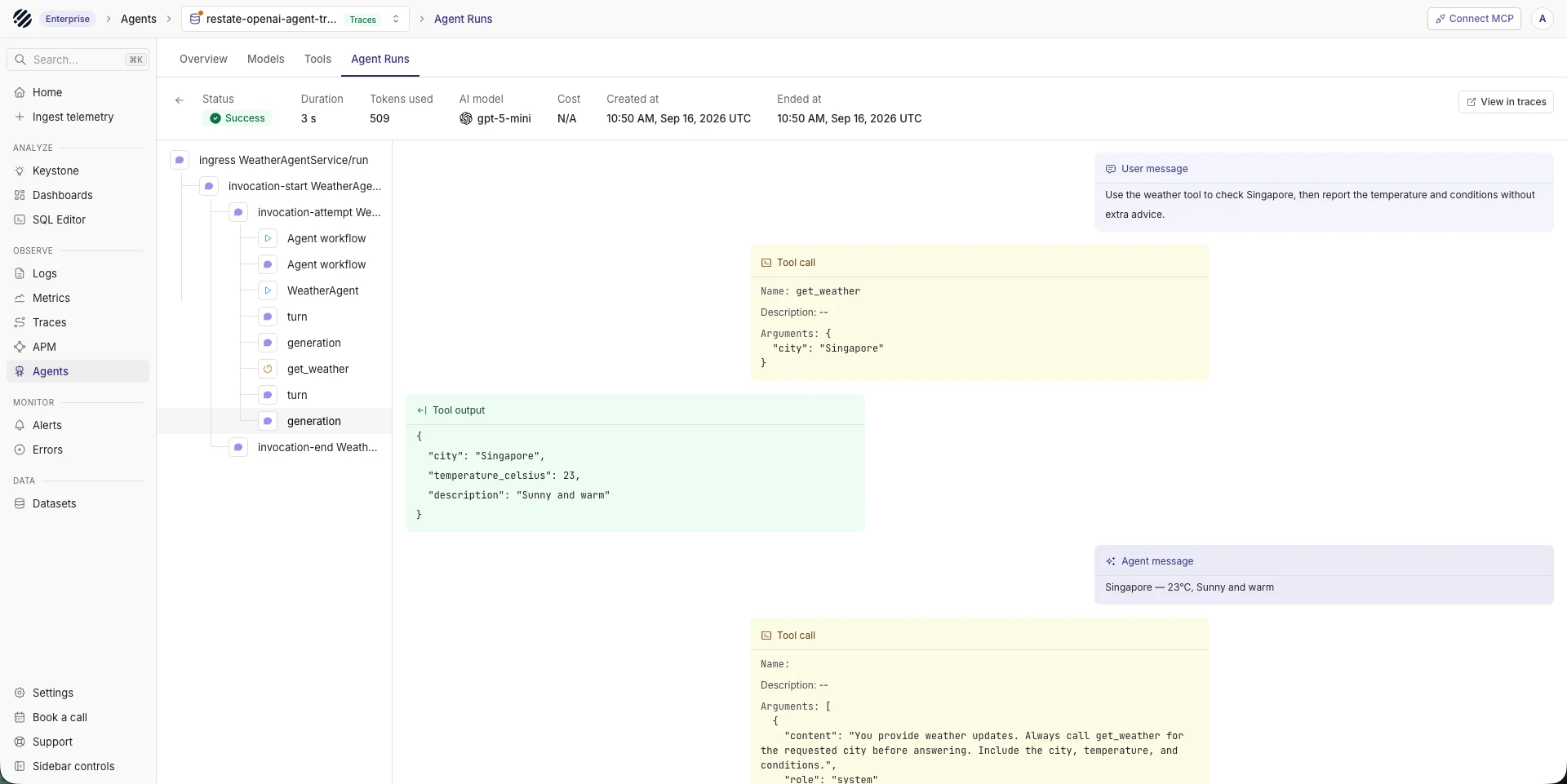
After the first invocation, add the agent-observability tag to restate-openai-agent-traces from the dataset settings. Open Agents and select the dataset to inspect prompts, responses, model details, token counts, tool calls, and duration.
Production configuration
Route both OTLP streams through an OpenTelemetry Collector in production. Configure a sending queue and retry policy to handle temporary network failures. Keep the Python service and Restate Server on the same trace dataset.
Disable prompt and response capture when those fields may contain sensitive data. An OpenTelemetry Collector processor can remove specific attributes before export.
Troubleshooting
- Traces appear but the dataset is missing from Agents: Add the
agent-observabilitydataset tag. The Agents page only lists tagged datasets. - Only Restate spans appear: Import
telemetrybefore creating the Restate application and confirm thatOpenInferenceTracingProcessoris registered. - Only agent spans appear: Start Restate with
--tracing-endpoint. SetRESTATE_TRACING_HEADERS__AUTHORIZATIONandRESTATE_TRACING_HEADERS__X_P_STREAM. - The hierarchy splits across traces: Wrap the OpenInference tracer with
RestateTracerand send both exporters to the same dataset. - Duplicate workflow spans appear: The OpenAI Agents SDK emits a workflow trace and a task span with the default
Agent workflowname. They represent separate instrumentation levels. - The last spans are missing: Call
provider.shutdown()when a short-lived process exits soBatchSpanProcessorcan flush buffered spans.
Next steps
- Explore runs in Agent Observability
- Configure an OpenTelemetry Collector
- Instrument another OpenAI application
Was this page helpful?