Exploited vulnerabilities have become a leading cause of breaches. The vulnerable asset is often something a team has forgotten: an old server, a legacy TLS endpoint, or an unexpected service.
This is a security posture problem. Posture measures the risk present in an environment before an attack happens. Posture management finds that risk, helps teams fix it, and checks that it stays fixed.
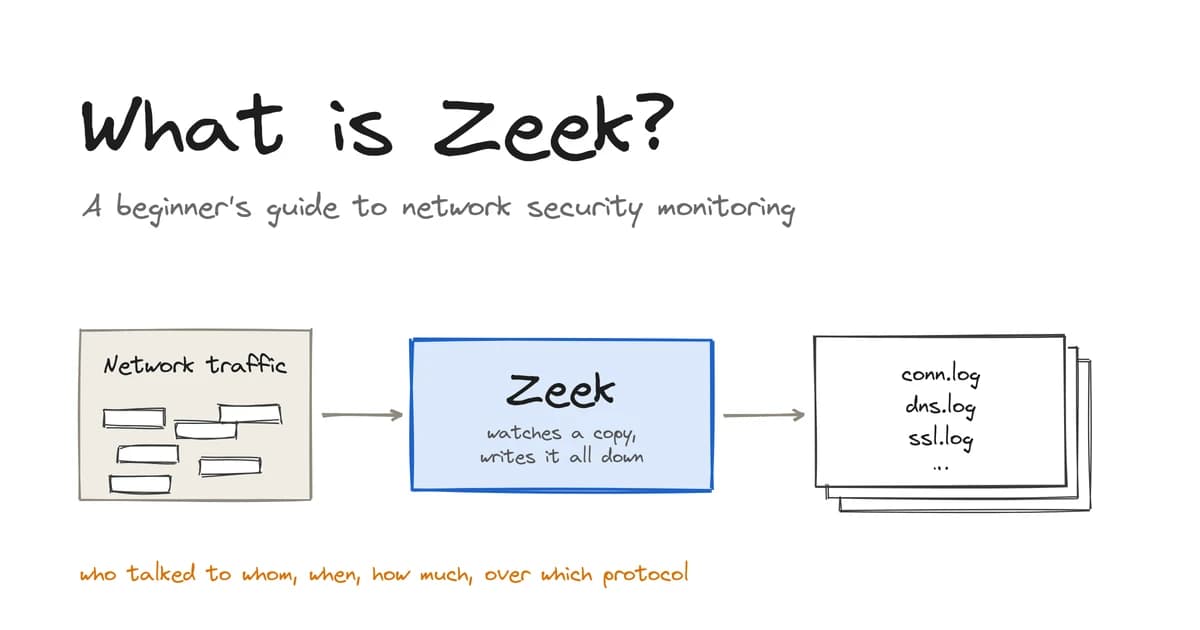
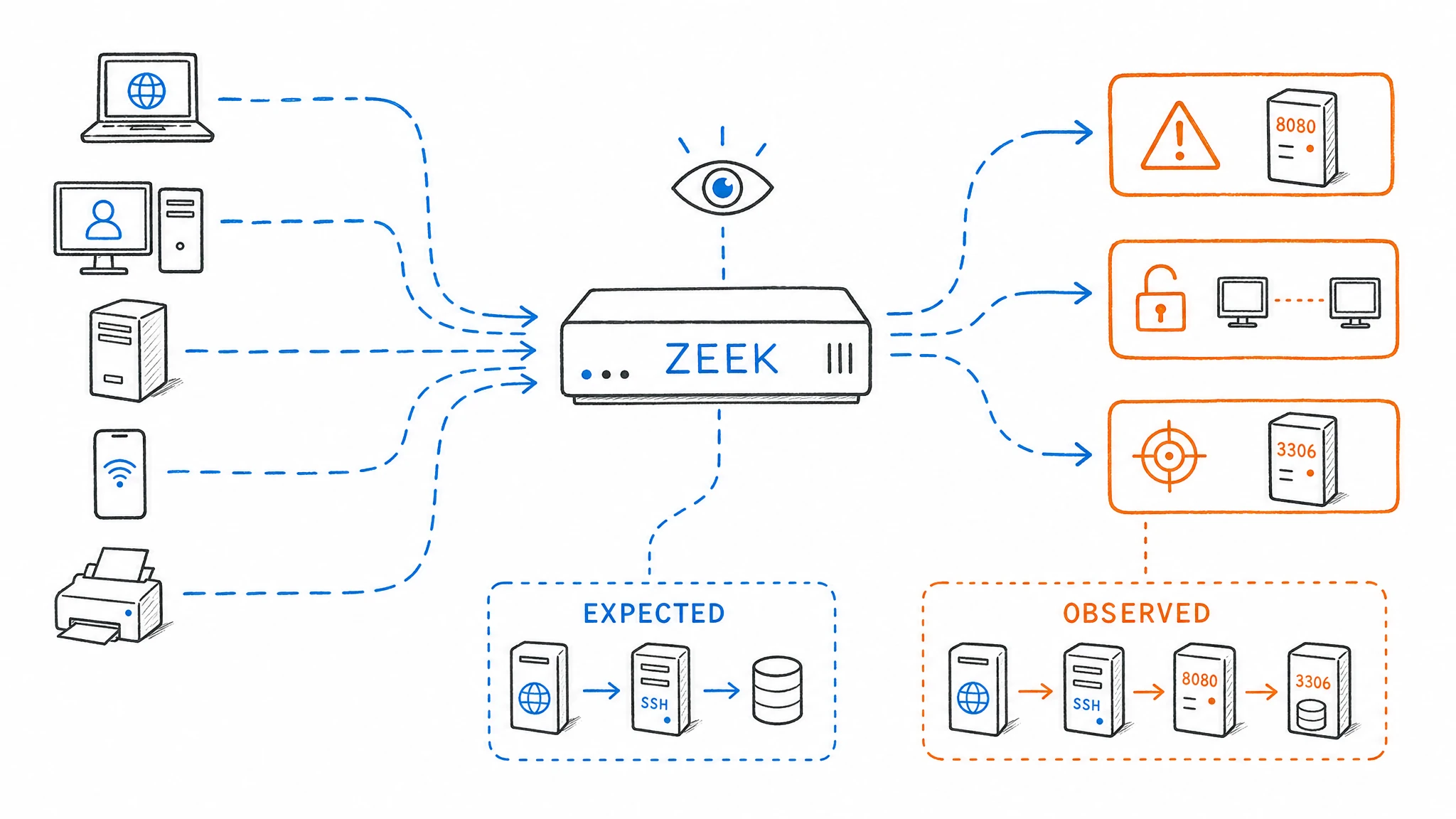
Most posture tools inspect configurations, asset inventories, and scan results. They show how you think the network looks. Zeek shows how the network behaves. By monitoring traffic on a link, it records who spoke to whom, which encryption they used, and what each endpoint disclosed about itself. Nothing needs to be installed on the hosts. If Zeek is new to you, start with our beginner's guide to Zeek.
Passive network data is an honest source of inventory. With enough history, it also reveals changes in posture. This post uses eight hours of synthetic hospital traffic to show seven checks you can run with Zeek and SQL. We cover the setup, findings, daily checks, plain-English analysis with Keystone, and Zeek's blind spots.
The setup
The simulated hospital has a server LAN containing a domain controller, file servers, and a mail server. A clinical LAN contains staff machines.
| Item | Value |
|---|---|
| Network | 9 internal hosts on two segments, talking to 212 destinations |
| Duration | 8 hours |
| Volume | 8,175 Zeek events, including 5,827 connections |
| Zeek logs | conn, dns, ssl, http, smtp, smb_mapping, smb_files, files, ntp |
| Storage | Parseable, one dataset, with fields normalized to ECS names |
The columns follow the Elastic Common Schema. For example, id.resp_h becomes destination_ip, and the TLS version becomes zeek_ssl_version. The event_dataset column identifies the Zeek log that produced each row.
The capture is replayed into Parseable in a loop, making it behave like a live feed. Because the same connection appears once per replay, every query below counts unique connections by Zeek's zeek_uid rather than counting rows.
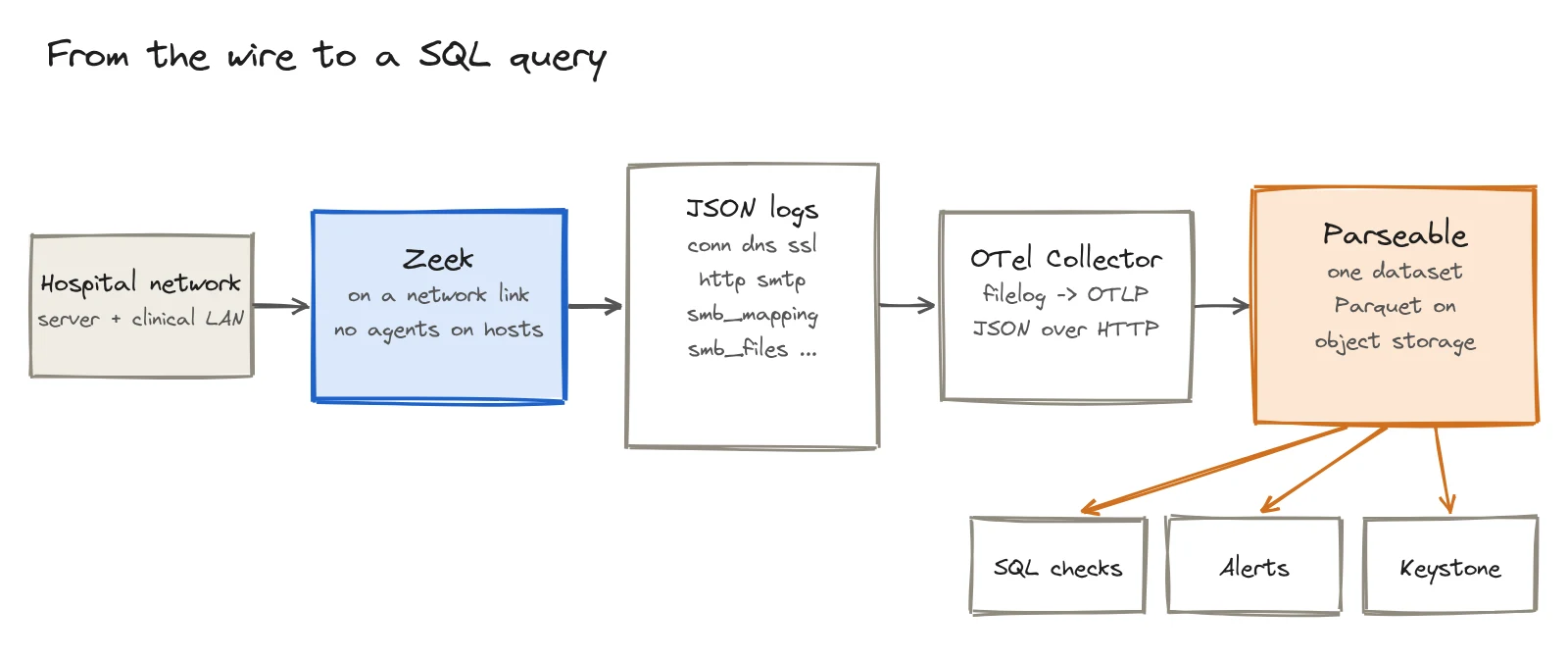
To send your own Zeek logs, enable JSON output in Zeek and point the OpenTelemetry Collector at the files:
receivers:
  filelog/zeek:
    include: [/zeek/*.log]
    operators:
      - type: json_parser

exporters:
  otlphttp/parseable:
    endpoint: http://localhost:8000
    encoding: json
    headers:
      X-API-KEY: ${env:PARSEABLE_API_KEY}
      X-P-Stream: zeek-demo

service:
  pipelines:
    logs/zeek:
      receivers: [filelog/zeek]
      exporters: [otlphttp/parseable]
Which Zeek logs describe security posture?
Zeek writes dozens of logs. These groups answer the main posture questions.
| Question | Zeek logs |
|---|---|
| What exists? | conn, known_hosts, known_services, software |
| How is it encrypted? | ssl, x509 |
| What travels in plain text? | conn, http, smtp, ftp, dns |
| Who shares what? | smb_mapping, smb_files |
| What did Zeek flag? | notice, weird |
conn contains every observed connection. A host that responds on a port is running a service. The known_hosts, known_services, and software scripts make this inventory clearer.
The ssl log records the TLS version and server name for each handshake, while x509 contains certificate details. Protocol logs such as http and smtp identify unencrypted application traffic. SMB logs show which file shares clients opened. Finally, notice and weird record warnings and unusual protocol behavior that Zeek detected.
Our capture contains the first log from each group plus the SMB logs. That is enough for the seven checks below.
Seven security posture checks with Zeek and SQL
1. Find unknown services
A service nobody knows about may also be a service nobody patches. Any internal host and port that completes a connection is a service worth matching against the asset inventory.
SELECT destination_segment_name, destination_ip, destination_port,
       COUNT(DISTINCT source_ip) AS clients,
       COUNT(DISTINCT zeek_uid) AS connections
FROM "zeek-demo"
WHERE event_dataset = 'conn'
  AND zeek_conn_local_resp = true
  AND destination_port > 0
  AND zeek_conn_conn_state IN ('SF', 'S1', 'S2', 'S3', 'RSTO', 'RSTR')
GROUP BY 1, 2, 3
ORDER BY 1, 2, 3;
We found 29 services responding across nine hosts. Most belonged on the server LAN: Kerberos, LDAP, DNS, and SMB on the domain controller, plus mail services on the mail server.
The clinical LAN contained four additional services beyond Windows RPC:
| Host | Port | Likely service |
|---|---|---|
10.42.10.21 | 8443 | HTTPS on a non-standard port |
10.42.10.22 | 8080 | Web server |
10.42.10.32 | 9997 | Common log-forwarder receiving port |
10.42.10.41 | 22 | SSH |
None is inherently malicious, but each one needs an owner and an explanation.
2. Detect database-port probing
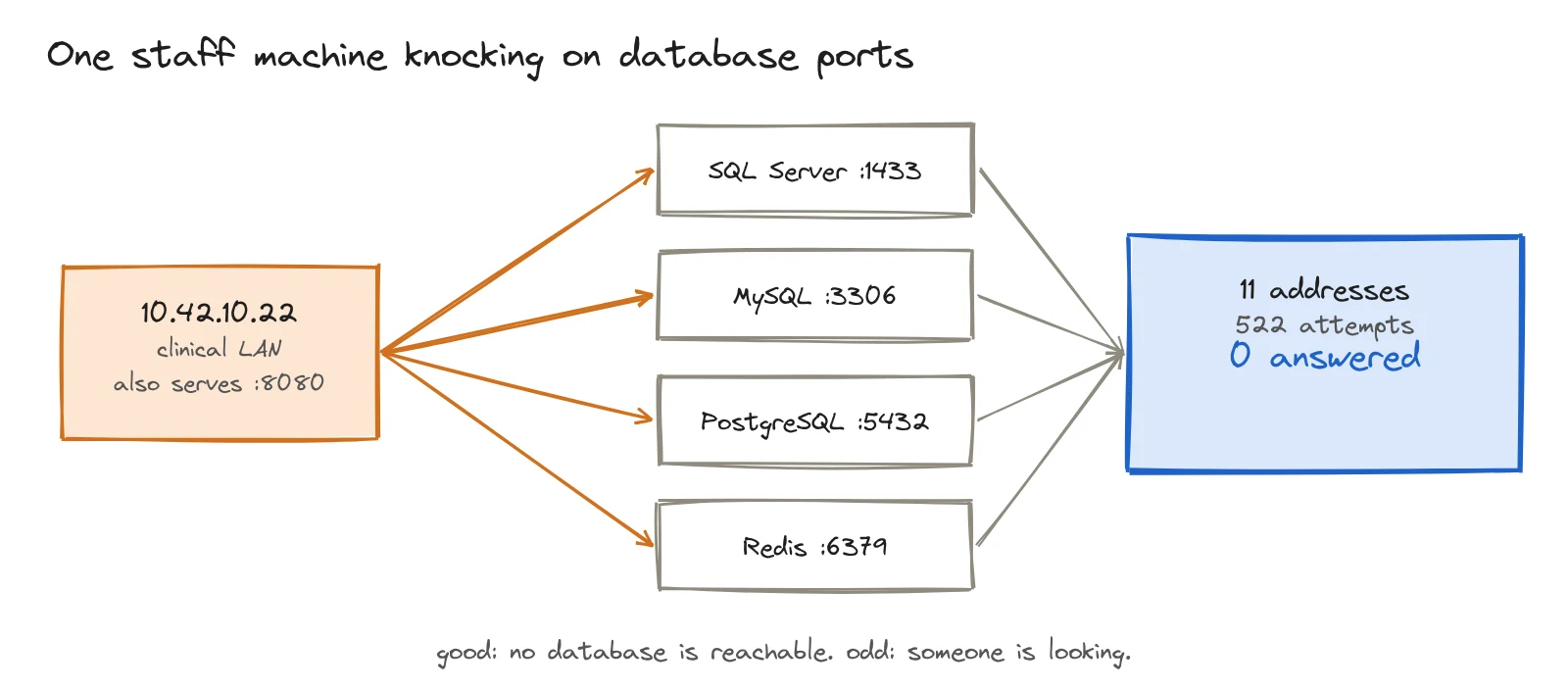
A database that answers requests from any machine on the network is exposed to stolen credentials and lateral movement. Zeek shows who attempted a connection and whether the target answered.
SELECT source_ip, destination_port,
       COUNT(DISTINCT destination_ip) AS targets,
       COUNT(DISTINCT zeek_uid) AS attempts,
       COUNT(DISTINCT CASE WHEN zeek_conn_conn_state <> 'S0'
                           THEN zeek_uid END) AS answered
FROM "zeek-demo"
WHERE event_dataset = 'conn'
  AND destination_port IN (1433, 3306, 5432, 6379)
GROUP BY 1, 2;
One host, 10.42.10.22, tried SQL Server, MySQL, PostgreSQL, and Redis ports on 11 addresses. It made 522 attempts, and none received a response. The databases were not reachable from the clinical LAN, but a clinical machine was scanning for them. It was the same host running a web server on port 8080.
3. Identify old TLS versions
TLS 1.0 and 1.1 are deprecated. A server that still negotiates them is likely old or neglected.
SELECT zeek_ssl_version,
       COUNT(DISTINCT zeek_uid) AS connections,
       COUNT(DISTINCT destination_ip) AS servers
FROM "zeek-demo"
WHERE event_dataset = 'ssl'
GROUP BY 1
ORDER BY connections DESC;| Version | Connections | Servers |
|---|---|---|
| TLS 1.3 | 298 | 93 |
| TLS 1.2 | 146 | 65 |
No connection used a version older than TLS 1.2. About one-third used TLS 1.2, including connections to the hospital's mail server. This is acceptable, but worth tracking.
4. Find unencrypted traffic
Anyone along the route can read unencrypted application data. Email and web traffic are common places to find it.
SELECT destination_ip, destination_port, zeek_smtp_tls,
       COUNT(DISTINCT zeek_uid) AS sessions
FROM "zeek-demo"
WHERE event_dataset = 'smtp'
GROUP BY 1, 2, 3
ORDER BY sessions DESC;
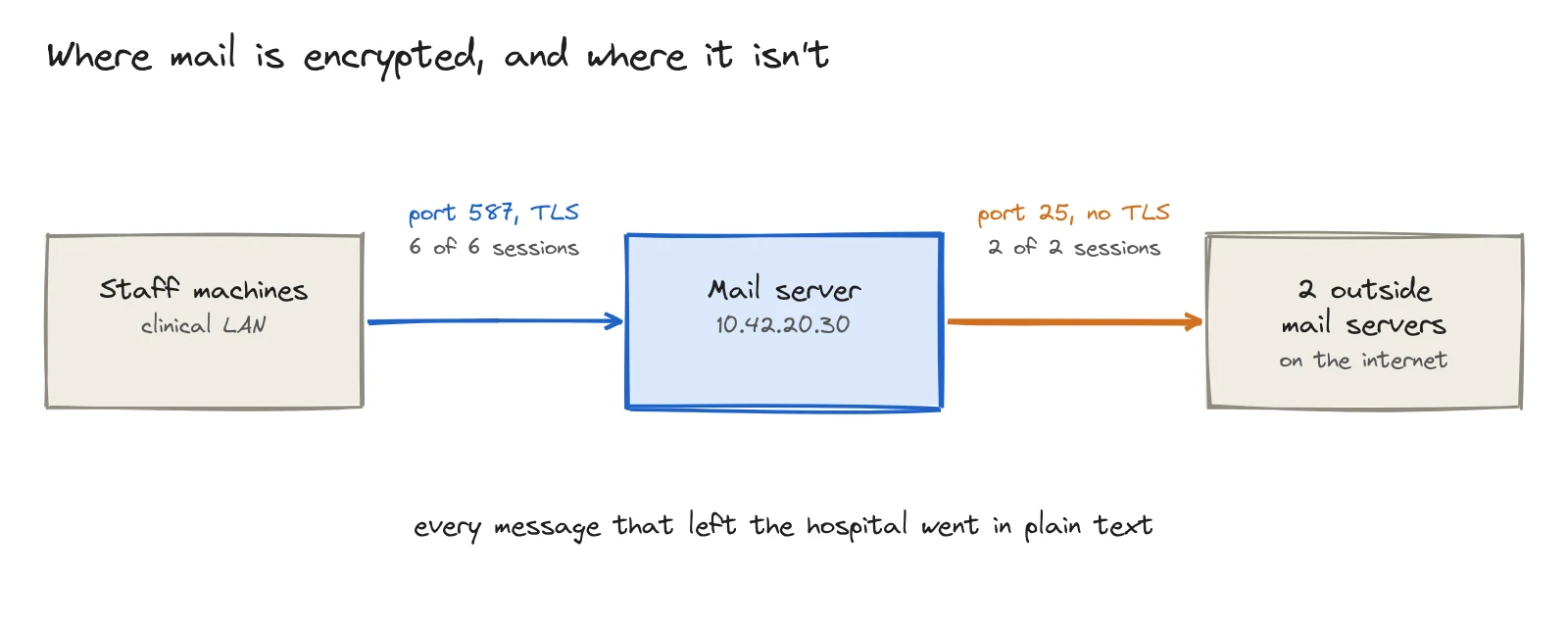
All six email sessions from staff machines to the hospital mail server used TLS on port 587. Neither of the two sessions from the mail server to external mail servers used TLS on port 25. The sample is small, but the pattern is clear: every email leaving the hospital crossed the internet in plain text.
HTTP showed a second gap:
SELECT destination_port, zeek_http_method,
       COUNT(DISTINCT event_hash) AS requests,
       COUNT(DISTINCT destination_ip) AS servers
FROM "zeek-demo"
WHERE event_dataset = 'http'
GROUP BY 1, 2
ORDER BY requests DESC;
Zeek recorded 110 unencrypted HTTP requests. They reached 66 servers on port 80 and three servers on port 8530, the default Windows Server Update Services port. Four machines made nine unencrypted POST requests to seven servers. We saw no Telnet or FTP traffic.
5. Review file-share access
File shares often hold an attacker's target data, and access can be easy to misconfigure. The SMB mapping log shows which shares clients opened.
SELECT zeek_smb_mapping_path AS share,
       COUNT(DISTINCT zeek_uid) AS mappings,
       COUNT(DISTINCT source_ip) AS clients
FROM "zeek-demo"
WHERE event_dataset = 'smb_mapping'
GROUP BY 1
ORDER BY mappings DESC;| Share | Mappings | Clients |
|---|---|---|
NSH-SAMBA-01\ClinicalArchive | 32 | 5 |
NSH-SAMBA-01\Software | 28 | 5 |
NSH-FILE-01\ClinicalOps | 24 | 5 |
NSH-FILE-01\Users | 24 | 5 |
NSH-FILE-01\Shared | 20 | 5 |
NSH-DC-01\SYSVOL | 12 | 4 |
NSH-DC-01\NETLOGON | 8 | 4 |
SYSVOL and NETLOGON are normal domain-controller shares. More important, all five clinical machines opened the clinical archive. If that is intended, the result confirms policy. If not, the traffic exposes an access-control problem that an asset inventory cannot show.
6. Check DNS resolver use and unusual names
DNS should go through approved resolvers so teams can filter and log requests. Long, random hostnames also deserve review because attackers can use them for data exfiltration.
SELECT destination_ip AS resolver,
       COUNT(DISTINCT source_ip) AS clients,
       COUNT(DISTINCT zeek_uid) AS lookups
FROM "zeek-demo"
WHERE event_dataset = 'dns'
GROUP BY 1
ORDER BY lookups DESC;

SELECT zeek_dns_query,
       COUNT(DISTINCT zeek_uid) AS lookups
FROM "zeek-demo"
WHERE event_dataset = 'dns'
  AND LENGTH(zeek_dns_query) > 50
GROUP BY 1
ORDER BY lookups DESC;
All 831 lookups from eight clients went to one internal resolver. The only name longer than 50 characters was an analytics tracking domain queried once. Both checks were clean.
7. Find services exposed to the internet
A host that accepts unsolicited connections from the internet is exposed whether or not anyone intended it. Zeek marks each side of a connection as local or external.
SELECT destination_ip, destination_port,
       COUNT(DISTINCT zeek_uid) AS connections
FROM "zeek-demo"
WHERE event_dataset = 'conn'
  AND zeek_conn_local_orig = false
  AND zeek_conn_local_resp = true
GROUP BY 1, 2;
The query returned no rows. Internal hosts initiated all 803 connections to 203 external hosts. Nothing on the internet connected in.
Two more checks to enable
The capture did not include enough certificate and software-version data for two useful checks. Load Zeek's policy/protocols/ssl/validate-certs and policy/protocols/http/software scripts, along with the SSH equivalent, to generate x509 and software logs.
- Bad or expiring certificates: Find certificates that expire within 30 days, use keys smaller than 2048 bits, use SHA-1 signatures, or are self-signed. In
ssl, flag anyvalidation_statusother thanok. - Outdated software: Compare server products and versions from
softwarewith supported versions and vulnerability feeds.
What eight hours of Zeek data found
| Check | Finding |
|---|---|
| Unknown services | 29 services on 9 hosts; 4 unexpected services on the clinical LAN |
| Database-port probing | 1 clinical host made 522 attempts against 11 addresses; none answered |
| Older TLS versions | None; about one-third of TLS connections used TLS 1.2 |
| Unencrypted traffic | All outbound internet mail; 110 HTTP requests, including 9 POSTs |
| File shares | 7 shares on 3 servers; every clinical machine opened the clinical archive |
| DNS | One resolver and no suspicious long names |
| Internet exposure | None detected |
Eight hours, one dataset, and seven queries established that the hospital was not directly reachable from the internet and had no legacy TLS. They also found unencrypted outbound mail, broad access to clinical shares, four unexpected services, and a staff machine probing database ports. None of those facts appeared in a configuration file.
Run posture checks every day
A single result is useful. Changes are more useful: Did plain-text mail stop after the fix? Did a new service appear on Tuesday? When did this host begin probing database ports?
Grouping by time turns a check into a trend. This query shows the database sweep by hour:
SELECT date_trunc('hour', to_timestamp(CAST(original_ts AS BIGINT))) AS hour,
       COUNT(DISTINCT zeek_uid) AS db_attempts
FROM "zeek-demo"
WHERE event_dataset = 'conn'
  AND destination_port IN (1433, 3306, 5432, 6379)
GROUP BY 1
ORDER BY 1;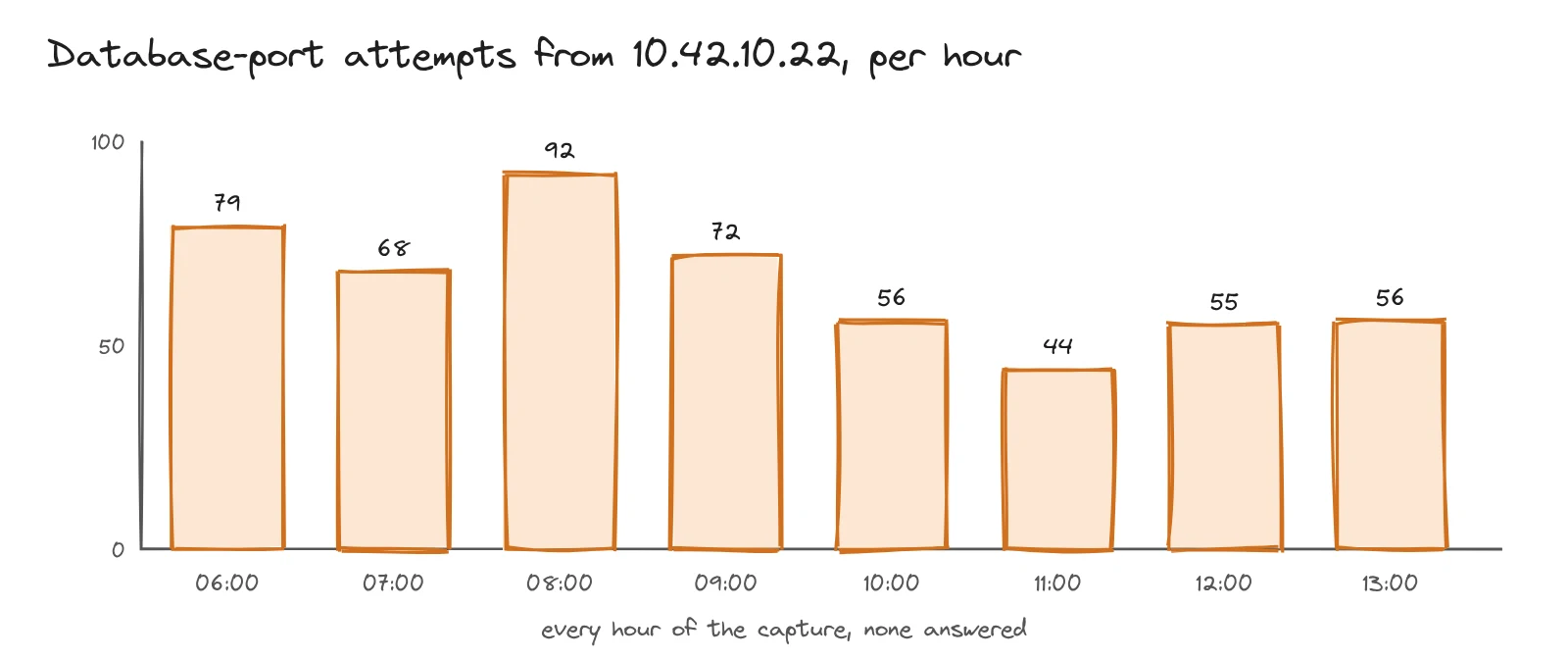
The sweep ran in every hour of the capture. That points to a scheduled or persistent process rather than a one-off action. Over weeks of data, the same query would show when it started and whether an investigation stopped it.
Parseable alerts can run SQL on a schedule and trigger when results cross a threshold. Useful starting alerts include any client attempting a database port and any new service responding on the network.
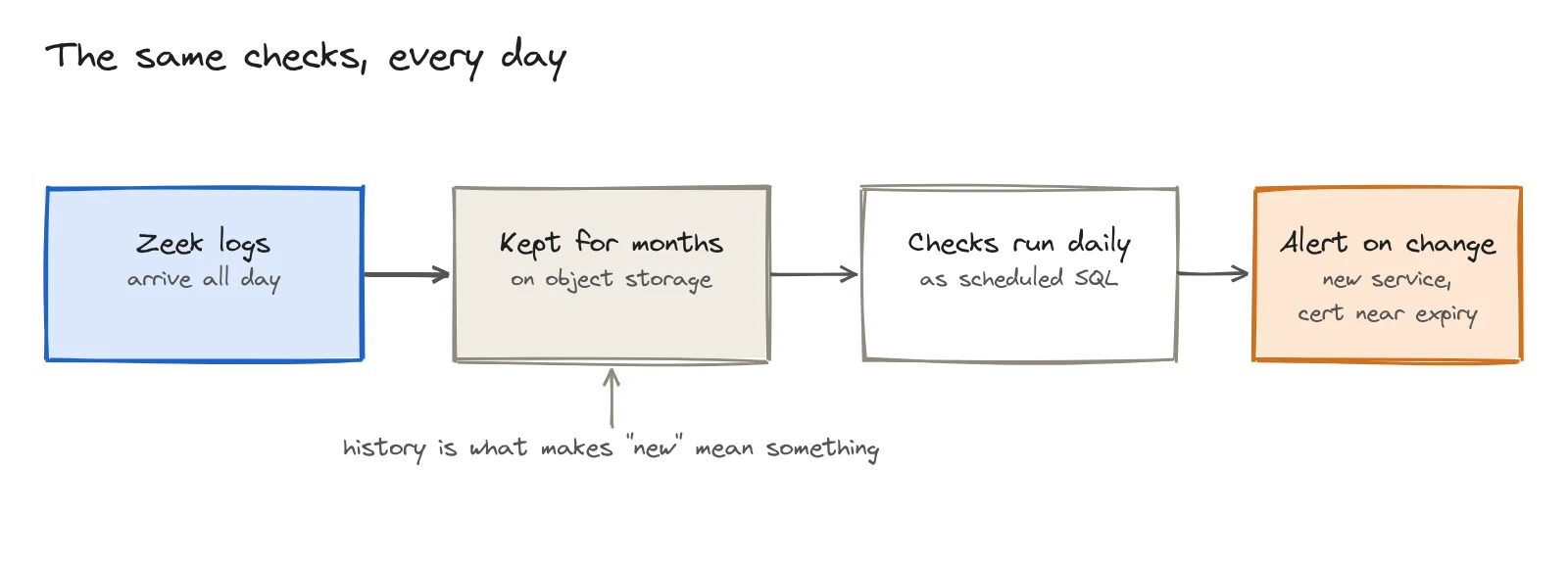
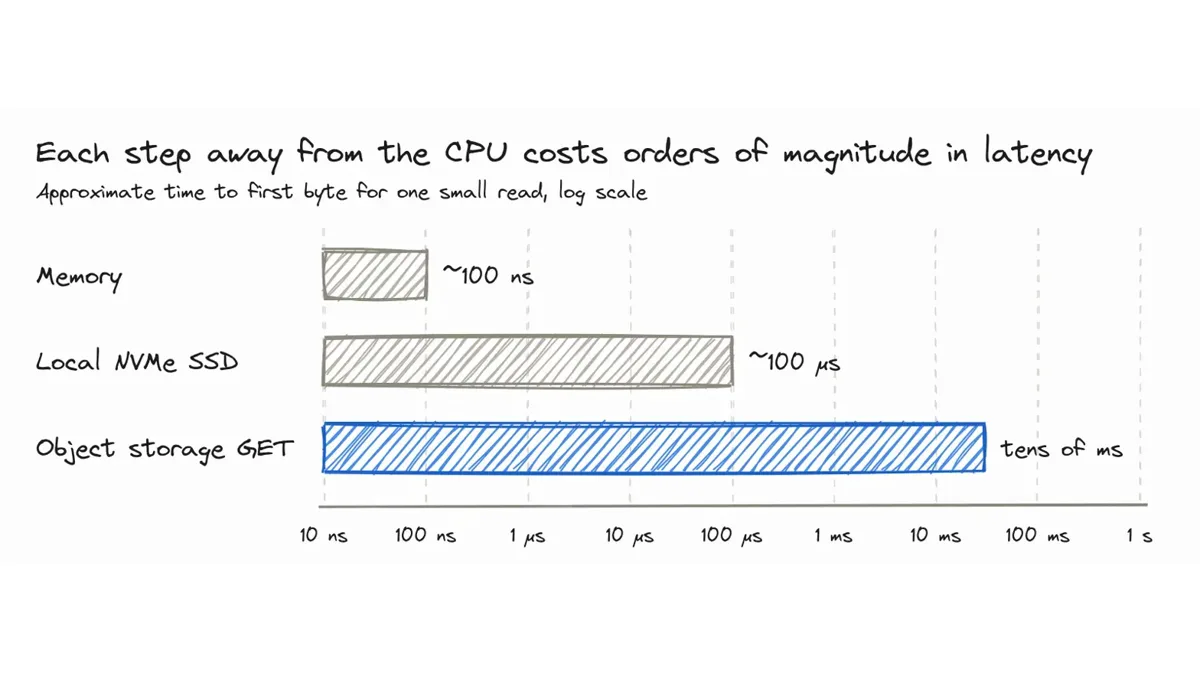
History gives the word "new" meaning. If the service does not appear far enough back in the data, its first appearance is a posture change. Parseable stores Zeek logs as Parquet files in object storage, making months of retention practical. Our guide to data lakes and data warehouses for observability explains the retention and query trade-offs.
Ask the same questions in plain English
The queries above assume you know which log contains the answer. Keystone, Parseable's AI assistant, can find the relevant data from a plain-English question. This follows the same workflow described in our guide to natural-language observability queries. We asked:
Which hosts are trying to reach database ports, and did any of them answer?
Keystone made 13 tool calls and reached the same conclusion as the manual query: one host, 10.42.10.22, contacted four database ports on 11 destinations, and none answered.
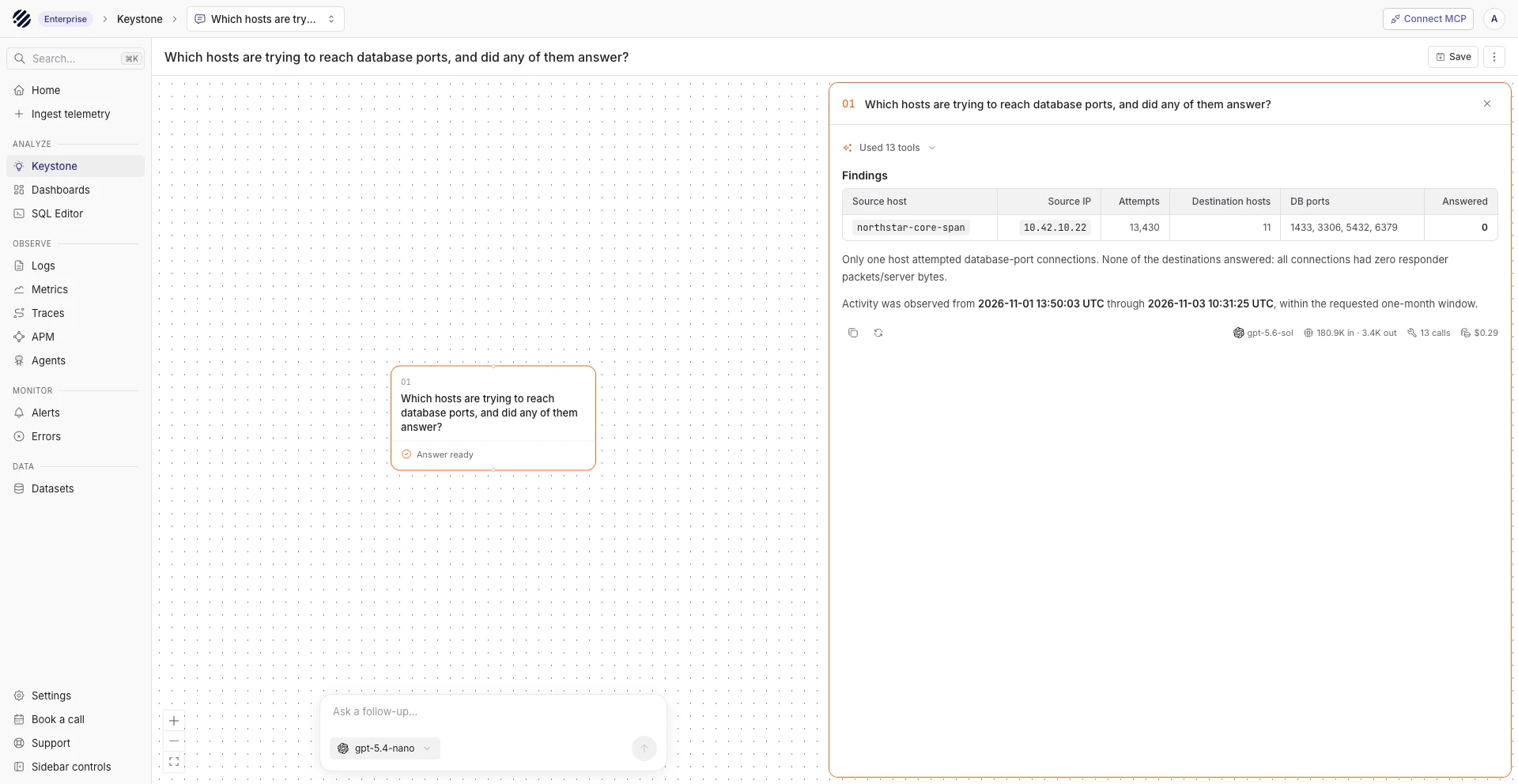
Its attempt count was higher because it counted replayed rows rather than unique zeek_uid values. Its first query also assumed the connection dataset was named zeek.connection; the actual value was conn, so it corrected the query.
Keystone checked more ports, adding Oracle, Cassandra, Memcached, and MongoDB, though only the original four had traffic. It also defined an answered request by responder packets or server bytes instead of connection state. Both methods reached the same result.
One field was mislabeled in the final grouping. host_name identified the Zeek sensor, northstar-core-span, not the source host. This is why generated SQL must remain visible: a reviewer can verify the logic, catch a field with the wrong meaning, and save a corrected query for a dashboard or alert.
Keystone is a fast way to investigate unfamiliar data. Saved, reviewed queries should power repeatable posture checks.
What Zeek cannot see
- Traffic outside the sensor's path. Communication between hosts on the same switch may stay behind the sensor.
- Encrypted payloads. Zeek can see TLS metadata such as version, cipher, and usually the server name, but not application data. TLS 1.3 encrypts the certificate, so certificate checks apply only where the certificate remains observable.
- Unused software. A package that never communicates is invisible. The same is true for a vulnerable library behind an otherwise healthy TLS endpoint.
- Intent. Zeek can show a machine scanning database ports, but it cannot decide whether the cause is a misconfigured tool, an administrator, or an attacker.
- Host configuration. Zeek does not actively scan hosts or inspect their settings. It complements configuration and vulnerability scanners rather than replacing them.
Your posture is what the network does
An asset inventory records what should exist. Zeek records what systems actually do. Compare both views, run the same checks every day, and retain enough history to identify when the answers change.
Send Zeek logs to Parseable, query them with SQL, and turn verified queries into scheduled alerts. Get started with Parseable.