
Restate
Ship Restate workflow traces and service logs to Parseable via an OpenTelemetry Collector
Restate is a durable execution engine that handles retries, state, and orchestration for workflows and services. Restate exports traces natively via OTLP. Service logs are emitted through the OpenTelemetry Logs SDK in your application code. Both signals flow through a single OpenTelemetry Collector that authenticates against Parseable and routes each signal to its own stream.
Architecture
Restate server  ──OTLP HTTP──▶  OTel Collector :4318  ──▶  Parseable  restate-traces
Node.js service ──OTLP HTTP──▶  OTel Collector :4318  ──▶  Parseable  restate-logs
The OTel Collector is the single point that holds Parseable credentials. Neither the Restate server nor the application process needs auth configuration.
Restate exports traces only: server-side spans covering ingress, invocation lifecycle, and retry attempts. It does not export metrics or logs via OTLP. Application logs must be instrumented separately using the OpenTelemetry Logs SDK.
Prerequisites
- Restate Server
1.7.0or later - Node.js
20+and@restatedev/restate-sdk - Docker (for the OTel Collector)
- A reachable Parseable instance
Step 1: Run the OTel Collector
Create otel-collector-config.yaml:
receivers:
  otlp:
    protocols:
      http:
        endpoint: 0.0.0.0:4318

processors:
  batch:

exporters:
  otlp_http/traces:
    endpoint: https://<parseable-host>
    headers:
      Authorization: "Bearer <parseable-api-key>"
      X-P-Stream: "restate-traces"

  otlp_http/logs:
    endpoint: https://<parseable-host>
    headers:
      Authorization: "Bearer <parseable-api-key>"
      X-P-Stream: "restate-logs"

service:
  pipelines:
    traces:
      receivers: [otlp]
      processors: [batch]
      exporters: [otlp_http/traces]
    logs:
      receivers: [otlp]
      processors: [batch]
      exporters: [otlp_http/logs]
Create docker-compose.yml:
services:
  otel-collector:
    image: otel/opentelemetry-collector-contrib:latest
    command: ["--config=/etc/otel/config.yaml"]
    volumes:
      - ./otel-collector-config.yaml:/etc/otel/config.yaml:ro
    ports:
      - "4318:4318"
    restart: unless-stopped
Start the collector:
docker compose up -dStep 2: Start Restate with tracing
The [tracing] TOML section is silently ignored by restate-server. Use the RESTATE_TRACING_ENDPOINT environment variable instead.
RESTATE_TRACING_ENDPOINT=otlp+http://localhost:4318/v1/traces \
  restate-server
The otlp+http:// scheme prefix forces HTTP/1 transport. Without it, Restate defaults to gRPC, which requires a separate port (4317) and uses the HTTP/2 framing that some Parseable deployments do not accept.
Save this as a start script (start-restate.sh):
#!/bin/sh
RESTATE_TRACING_ENDPOINT=otlp+http://localhost:4318/v1/traces \
  restate-server
Step 3: Instrument service logs
Install the OTel Logs SDK:
npm install @opentelemetry/sdk-logs \
            @opentelemetry/exporter-logs-otlp-http \
            @opentelemetry/api-logs \
            @opentelemetry/resources \
            @opentelemetry/semantic-conventions
Create src/telemetry.ts:
import { LoggerProvider, BatchLogRecordProcessor } from "@opentelemetry/sdk-logs";
import { OTLPLogExporter } from "@opentelemetry/exporter-logs-otlp-http";
import { resourceFromAttributes } from "@opentelemetry/resources";
import { ATTR_SERVICE_NAME } from "@opentelemetry/semantic-conventions";
import { logs } from "@opentelemetry/api-logs";

const exporter = new OTLPLogExporter({
  url: "http://localhost:4318/v1/logs",
});

const provider = new LoggerProvider({
  resource: resourceFromAttributes({ [ATTR_SERVICE_NAME]: "restate-service" }),
  processors: [new BatchLogRecordProcessor(exporter)],
});

logs.setGlobalLoggerProvider(provider);

export const logger = logs.getLogger("restate-service");

export async function shutdownTelemetry() {
  await provider.shutdown();
}
Use the logger in your Restate handlers instead of console.log:
import * as restate from "@restatedev/restate-sdk";
import { logger } from "./telemetry.js";
import { SeverityNumber } from "@opentelemetry/api-logs";

const exampleWorkflow = restate.workflow({
  name: "ExampleWorkflow",
  handlers: {
    run: async (ctx: restate.WorkflowContext, name: string): Promise<string> => {
      const greeting = await ctx.serviceClient(greeterSvc).greet(name);

      await ctx.run("emit-completed", async () => {
        logger.emit({
          severityNumber: SeverityNumber.INFO,
          severityText: "INFO",
          body: `ExampleWorkflow done: ${greeting}`,
          attributes: { workflow: "ExampleWorkflow", name },
        });
      });

      return greeting;
    },
  },
});
Wrap logger.emit() inside ctx.run() to make log emission durable and replay-safe. Restate replays handler code on retry; calls outside ctx.run() execute on every replay and produce duplicate log records.
Step 4: Register and run
Start the service:
npx tsx src/app.tsRegister the deployment:
restate deployments register http://localhost:9080Invoke a workflow:
restate workflow submit ExampleWorkflow my-id '"World"'Verify
Check the collector is forwarding both signals:
docker compose logs otel-collector | grep "Preparing to make HTTP request"You should see requests to both /v1/traces and /v1/logs.
Query Parseable:
-- Recent traces
SELECT p_timestamp, name, trace_id, span_id, duration_nano
FROM "restate-traces"
WHERE p_timestamp > now() - INTERVAL '5 minutes'
ORDER BY p_timestamp DESC
LIMIT 20;
-- Service logs
SELECT p_timestamp, body, severity_text
FROM "restate-logs"
WHERE p_timestamp > now() - INTERVAL '5 minutes'
ORDER BY p_timestamp DESC
LIMIT 20;What gets captured
Traces (restate-traces)
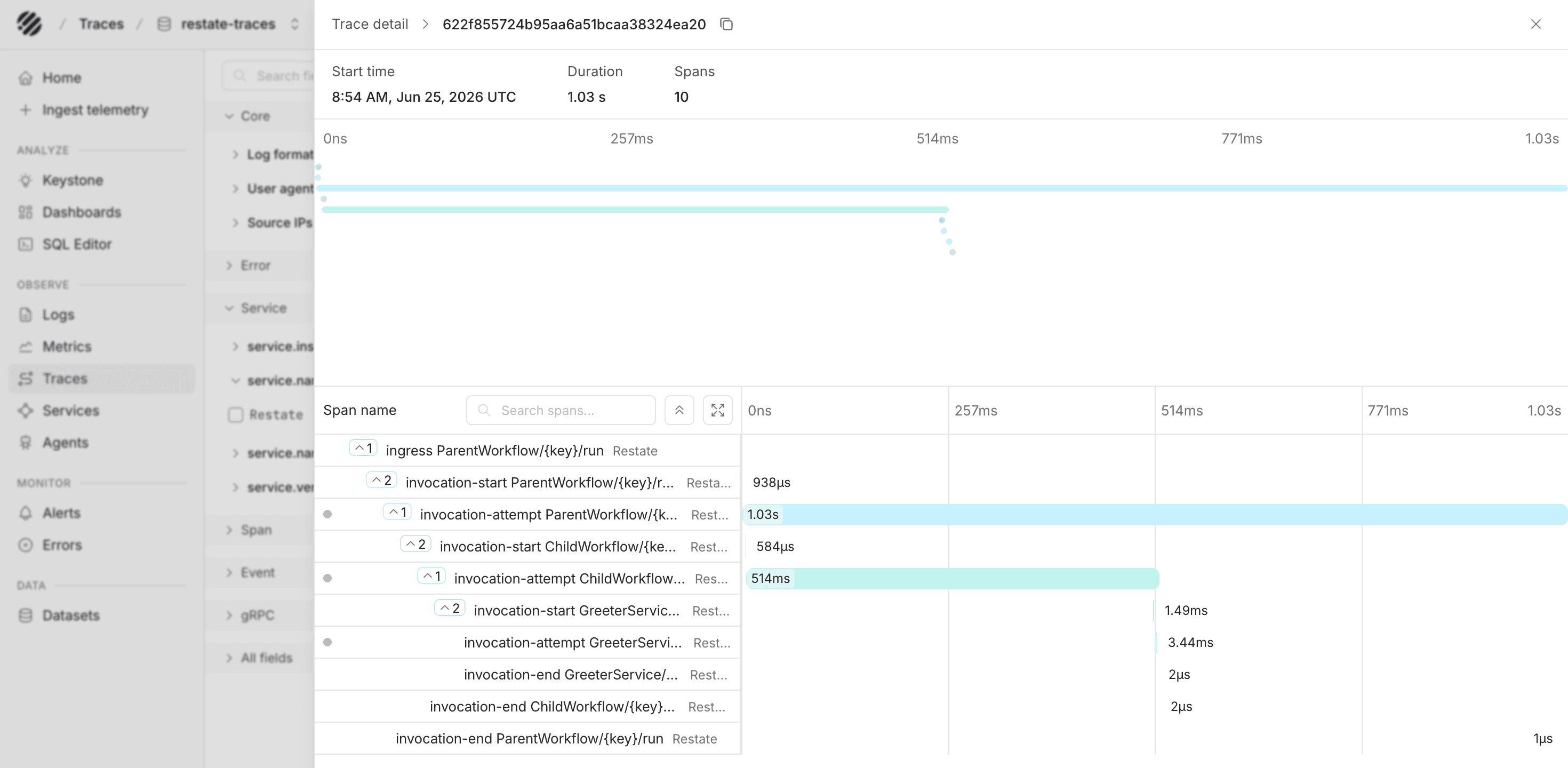
These are Restate server spans exported via RESTATE_TRACING_ENDPOINT. The server emits one trace per invocation:
| Span | Description |
|---|---|
ingress | Root span for the HTTP entry point where the request was accepted |
invocation | Logical invocation; child of ingress |
invocation_attempt | One span per execution attempt; retries produce new attempt spans |
invocation_end | Marks completion (success, failure, or cancellation) |
ctx.run() blocks, ctx.sleep(), and outbound service calls appear as events on the invocation_attempt span, not as child spans. Attempt spans carry restate.invocation.id, restate.service.name, and restate.handler.name as attributes.
In Parseable, the trace stream gives you a timeline of Restate invocations and the span attributes attached to each attempt. This is where you can inspect duration, invocation metadata, and retry behavior for a workflow.
Logs (restate-logs)
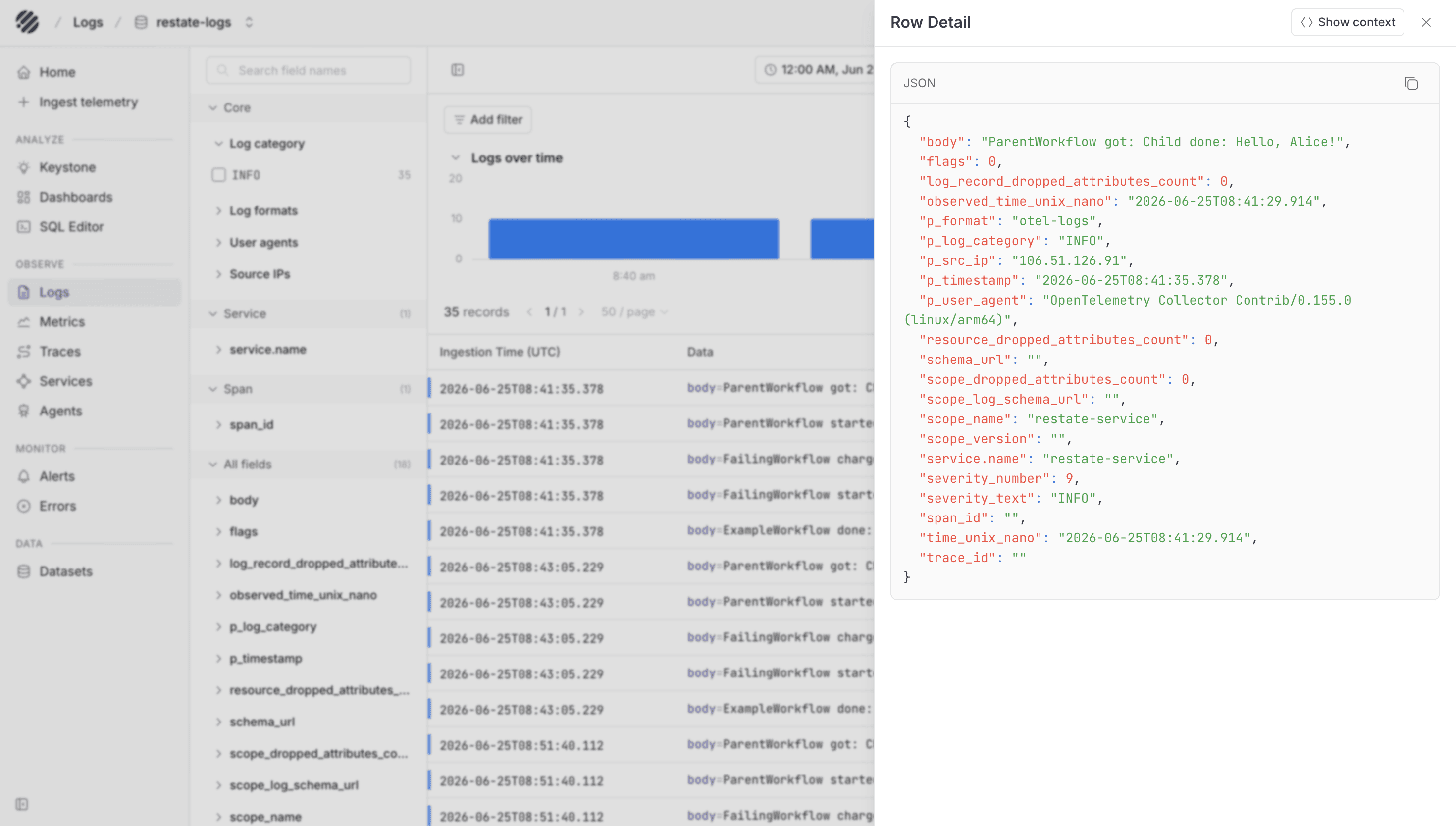
Logs are application-defined. The OTel SDK attaches service.name and any attributes passed to logger.emit(). A minimal schema to adopt:
| Field | Notes |
|---|---|
body | Human-readable message |
severity_text | INFO, WARN, ERROR |
service.name | Set in resourceFromAttributes |
workflow | Add as attribute for cross-signal correlation |
In the logs stream, Parseable shows the emitted application records along with severity, service attributes, and workflow attributes. This makes it easier to connect what the service wrote with the Restate invocation you are investigating.
Troubleshooting
- No traces in collector: The
[tracing]TOML key is silently ignored. ConfirmRESTATE_TRACING_ENDPOINTis set in the environment, not in the config file. - gRPC connection refused or FRAME_SIZE_ERROR: Remove any
grpc://or barehttp://prefix. Useotlp+http://localhost:4318/v1/tracesto force HTTP/1. - Duplicate log records on retry:
logger.emit()calls must be insidectx.run(). Code outsidectx.run()re-executes on every Restate replay. - Collector deprecation warning
"otlphttp" alias is deprecated: Useotlp_http/as the exporter key (underscore, not camel-case). Both work;otlp_http/suppresses the warning.
Was this page helpful?